

Baseten Realtime Voice is in Private Preview. Join the waitlist
to get it enabled for your organization.
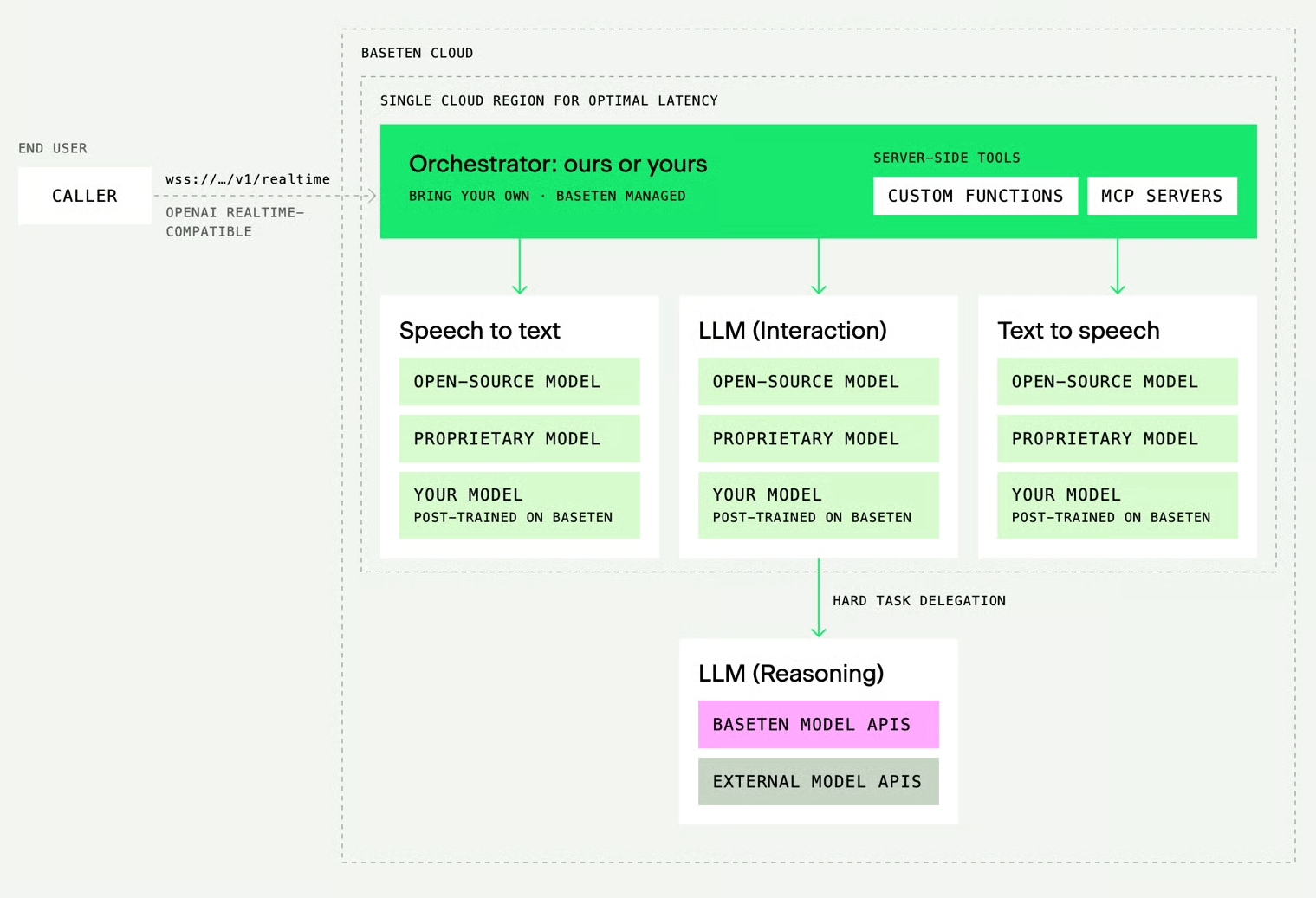
What the agent can do
- Choose each model. Pick the STT, LLM, and TTS model independently. STT and TTS run inside the Chain; the LLM can be any model deployed on Baseten, a model hosted on Model APIs, or your own OpenAI-compatible endpoint. A session can switch the LLM, voice, or STT route without a redeploy. To compare STT and TTS models, see the Speech and audio overview.
- Natural turn-taking. Voice activity detection, an end-of-turn model, and speculative replies (the agent starts a reply when the caller pauses, and sends it if the turn ends there) work together so the agent neither cuts callers off mid-thought nor leaves long gaps. Callers can interrupt, short acknowledgments like “mm-hmm” don’t cancel the reply, and push-to-talk is one setting away.
- Tools. Give the agent client tools, remote Model Context Protocol (MCP) servers it calls directly, or web search through Model APIs. With delegation, a stronger model takes over tool calls and decisions while the voice model keeps the conversation. Before a slow tool call, the agent says a short acknowledgment so the line doesn’t go quiet. For guidance on tool definitions that the LLM can use reliably, see Function calling.
session.update fields, which the API reference documents.
Connect with the OpenAI Agents SDK
The OpenAI Agents SDK speaks the OpenAI Realtime protocol. This example runs a support call from your terminal: the agent greets you, you ask about an order, it looks up the order with a tool, and it answers. The agent detects the end of each turn and replies on its own, and you can talk over it. To run this example, you need your Chain ID, which Baseten provides when it enables Realtime Voice for your organization, plus a Baseten API key. Install the dependencies withpip install openai-agents sounddevice, set BASETEN_API_KEY, and replace <chain_id> in the URL with your Chain ID.
raw_model_event: history_added items from the SDK don’t carry the agent’s transcript.
- Use headphones. The example doesn’t cancel echo, so on speakers the agent hears itself and stops mid-reply. To cancel it in Python, see Cancel echo in a Python client.
- On macOS, allow your terminal to use the microphone when prompted. Until you do, the agent hears silence.
- For a development deployment, connect to
/development/websocketin place of/environments/production/websocket. The API reference lists every URL form. - To check the connection without a microphone, run the text-only example at the end of the API reference.
The endpoint accepts WebSocket connections only. Any Realtime client that accepts a full WebSocket URL can connect. The
openai Python SDK appends /realtime to its base URL, which the endpoint doesn’t serve, so it can’t connect directly. Browsers can’t set the Authorization header. Connect them through your own backend, which holds the API key and relays the socket.Set session fields from the SDK
The SDK sets the voice throughmodel_settings. Voice names depend on the deployment’s TTS model. For available voices and transcription settings, see Voice and transcription settings.
RealtimeAgent accepts only function tools and rejects MCP tools. For MCP tools, x_-prefixed fields, and other fields the SDK doesn’t model, send a session.update as a raw event once the session is open, before you stream audio:
other_data into the event body and checks the result against OpenAI’s event schema. Keep "type": "realtime" in session: without it the check fails, and the SDK drops the event and logs Failed to convert raw message. Baseten’s own fields, such as tool_acknowledgement or x_llm, pass the check. An update changes only the fields it sends, so it keeps the settings the SDK sent when it connected.
Next steps
- Work through the recipes, from a phone support agent to client tools, MCP servers, delegation, and switching the LLM per turn.
- Write your
instructionswith the prompting guide. - Follow the best practices for audio, interruptions, tool calls, and latency.
- Refer to the API reference for every event and
session.updatefield. - Contact us to get Baseten Realtime Voice enabled for your organization or to discuss your use case.