

state and define the questions to answer in questions.
Choose how to start
Supported models
Question types
Include questions about the same state in one request to reuse the shared input prefix. Each answer appears under its question’s name in the response. The model evaluates each question independently; use application logic to combine the answers.
Send a decision request
Create a Baseten API key and set theBASETEN_API_KEY environment variable. This request routes a support ticket, checks whether the customer wants a refund, and scores urgency.
Send plain text, a JSON object or array, or a conversation as {"messages": [...]} in state. Define the decisions in questions; the response returns each answer under its question’s name. For more information, see the accepted input formats.
- Python
- JavaScript
- cURL
Install the Python Performance Client with
python3 -m pip install baseten-performance-client before running this example.To evaluate the support request:Save the following code as decide.py, then run python3 decide.py:0, so the example’s score of 0.5125 falls between “Routine request” and “Needs attention today”. A noul value is a probability, so your application chooses the threshold for a yes/no decision. Probabilities and scores can vary between requests.
The examples use "service_tier": "default". Set service_tier to "flex" for flex processing or "priority" for priority processing. Flex requests cost approximately 90% of the default tier price. By default, priority requests cost 2x the default tier, unless stated otherwise in the pricing overview. For more information, see service_tier and Model API pricing.
For more information, see the System One API reference.
Apply a decision threshold
Route a ticket automatically when the selected option’s probability is at least 0.9. Otherwise, send it for review. Set theBASETEN_API_KEY environment variable before running an example.
- Python
- JavaScript
- cURL
Install the Python Performance Client with
python3 -m pip install baseten-performance-client before running this example.To route a ticket using a probability threshold:Save the following code as route_ticket.py, then run python3 route_ticket.py:probabilities[choice] for the selected option’s probability. Test the threshold against labeled examples and adjust it for the mistakes your application can tolerate. The confidence field measures how concentrated the distribution is; it isn’t the selected option’s probability.
For more information, see choice answer fields.
Evaluate images
Send images in a user message understate.messages, with an array of text and image_url parts in content. You can ask several questions about the same images in one request. For more information, see supported image sources and limits.
Download the example screenshot as 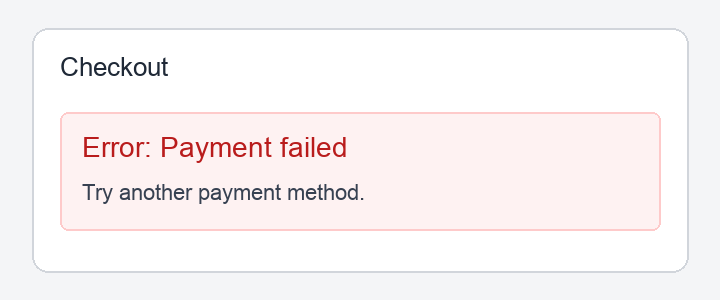
screenshot.png in your working directory, or use your own PNG. The sample shows an Error: Payment failed message. Set the BASETEN_API_KEY environment variable before running an example.
- Python
- JavaScript
- cURL
Install the Python Performance Client with
python3 -m pip install baseten-performance-client before running this example.To check whether a screenshot shows an error:Save the following code as check_image.py, then run python3 check_image.py:answers.error_visible.noul value is the probability that the image shows an error message. The output above comes from the example screenshot; your result depends on the image. Apply a threshold in your application as you would for text decisions.
Usage
The response reports input tokens inusage.input_tokens and one output token per question in usage.output_tokens. Input usage counts the shared prefix once, plus each question’s tokens. Sending related questions together avoids repeating the state in separate requests.
For more information, see Model API usage to track requests and tokens.