

- Configure failure thresholds to control when Baseten stops traffic or restarts a replica.
- Write custom health check logic to define what “healthy” means for your model (for example, mark unhealthy after repeated 5xx errors or a specific CUDA error).
Health probes
Baseten uses three Kubernetes health probes: startup, readiness, and liveness. Each serves a different purpose in the replica lifecycle.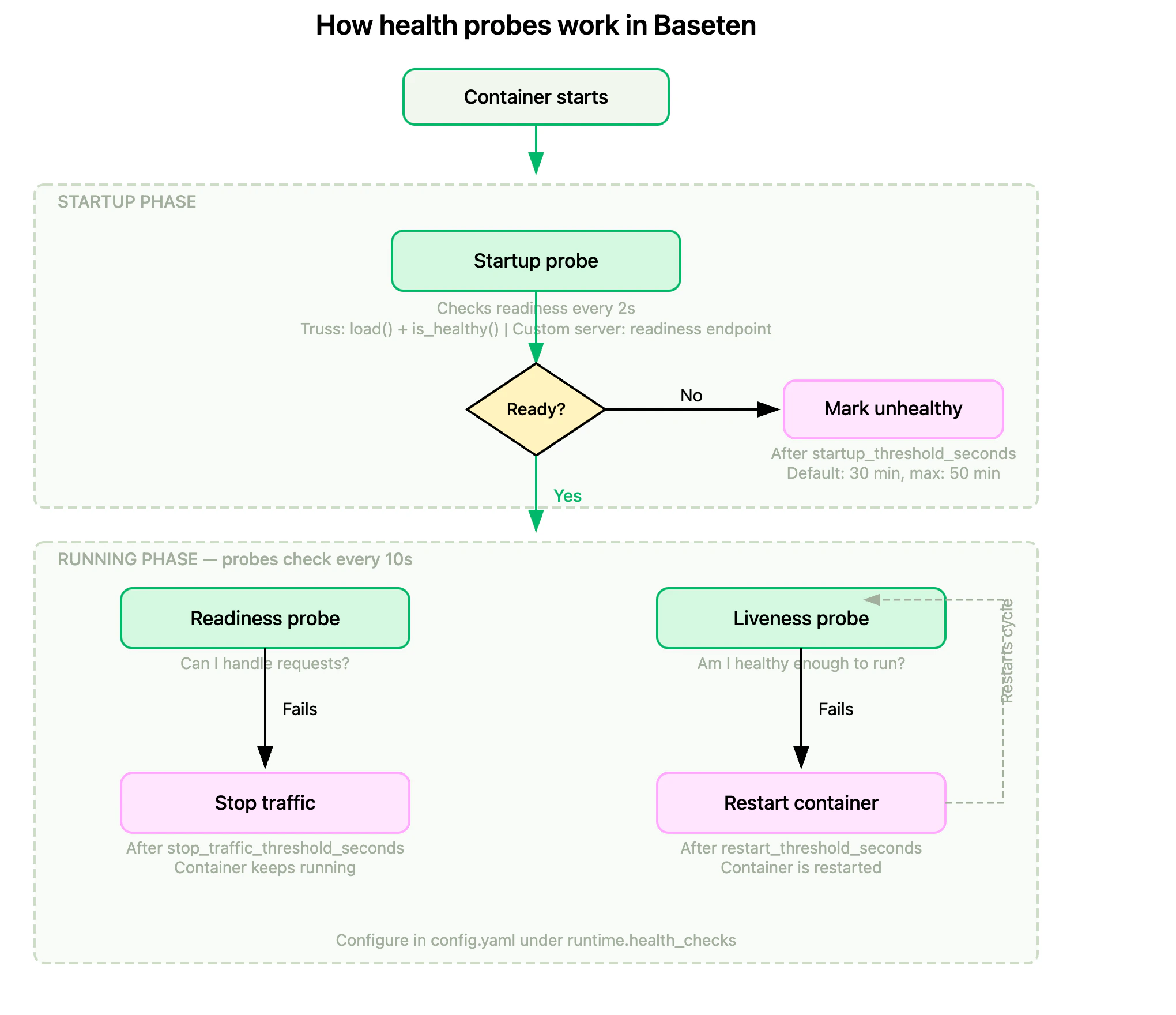
Startup probe
The startup probe confirms your model has finished initializing. For Truss models, initialization is complete whenload() finishes and the optional is_healthy() check passes. For custom servers, the readiness endpoint must return a successful response. All readiness and liveness probes are delayed until the startup probe succeeds.
The startup phase runs for 30 minutes by default. Extend it with startup_threshold_seconds up to 50 minutes (3000 seconds) for models that need more time to load. The startup probe uses the same endpoint as the readiness probe. You can’t configure a separate startup endpoint.
Readiness probe
The readiness probe determines whether a replica can accept traffic. When it fails, Kubernetes stops routing requests to the replica but doesn’t restart it. Configure the failure window withstop_traffic_threshold_seconds.
Liveness probe
The liveness probe determines whether a replica is still functioning. When it fails, Kubernetes restarts the replica to recover from deadlocks or hung processes. Configure the failure window withrestart_threshold_seconds.
For most models, using the same endpoint (like
/health) for both readiness and liveness probes is sufficient. The difference is the action taken: readiness controls traffic routing, liveness controls container lifecycle.Health check configuration
Parameters
Customize health checks by setting these parameters:integer
default:1800
How long the startup phase runs before marking the replica as unhealthy. During this phase, readiness and liveness probes don’t run.
startup_threshold_seconds must be between 10 and 3000 seconds, inclusive. Defaults to 30 minutes (1800 seconds).integer
default:1800
How long health checks must continuously fail before Baseten stops traffic to the failing replica.
stop_traffic_threshold_seconds must be between 10 and 3000 seconds, inclusive. Defaults to 30 minutes (1800 seconds).integer
default:1800
How long health checks must continuously fail before Baseten restarts the failing replica.
restart_threshold_seconds must be between 10 and 3000 seconds, inclusive. Defaults to 30 minutes (1800 seconds).integer
deprecated
How long to wait before running health checks. Must be between
0 and 3000 seconds, inclusive. The combined value of
restart_check_delay_seconds and restart_threshold_seconds can’t exceed 3000 seconds. Choose threshold values
The platform defaults (30 minutes for each threshold) are deliberately conservative. Most deployments are better served by tighter values that fail faster when something goes wrong. The rules below give you a starting point anchored to one observable input: how long your model takes to become ready. To find your cold start time, open the model’s Metrics tab and use the worst observed cold start across the environments you care about (dev, staging, production, and any size variants). Cold starts can vary widely by environment, so a single average is misleading.Set to 2× your worst observed cold start.Bias high. A value that’s too low can kill replicas mid-load, which then restart and try to load again, and the cycle compounds on GPU-saturated clusters where a new replica may not get scheduled immediately.
Start at 60 seconds (six consecutive failed checks).Bias low. Every second past first failure is a request that may land on a degraded replica. Raise this only if your
is_healthy() deliberately reports unhealthy for stretches you want to ride out, for example a self-healing transient or a planned warmup buffer.Set to 1.5×
stop_traffic_threshold_seconds (90 seconds with the default above).Lower it, or invert the order so restarts happen before stop-traffic, when a restart is your fastest recovery path. Raise it when restarts are expensive, for example a long re-load with weight downloads.These are starting points, not final answers. Watch the Restarts metric after changing thresholds to confirm the behavior matches what you expect.
Model and custom server deployments
Configure health checks in yourconfig.yaml.
config.yaml
Chains
Useremote_config to configure health checks for your chainlet classes.
chain.py
Custom health check logic
You can write custom health checks in both model deployments and chain deployments.Custom health checks aren’t supported in development deployments.
Custom health checks in models
model.py
Custom health checks in chains
Health checks can be customized for each chainlet in your chain.chain.py
Health checks in action
Observe probe behavior
The model’s Metrics tab surfaces probe activity in production through the Restarts graph, which counts container restarts, including those triggered by failed liveness probes. Use it to confirm that threshold changes have the effect you expect, or to spot probe failures that aren’t surfaced anywhere else. If you export metrics,baseten_pod_readiness splits pods by their Ready condition, so you can see when a readiness probe pulls traffic from a replica.
5xx error detection
Create a custom health check to identify 5xx errors:model.py
Example health check failure log line
Example restart log line
FAQs
Is there a rule of thumb for configuring thresholds for stopping traffic and restarting?
For starting values anchored to your model’s cold start time, see Choose threshold values. The relative ordering ofstop_traffic_threshold_seconds and restart_threshold_seconds depends on your health check implementation. If your health check relies on conditions that only change during inference (for example, _is_healthy is set in predict), restarting before stopping traffic is generally better, as it allows recovery without disrupting traffic.
Stopping traffic first may be preferable if a failing replica is actively degrading performance or causing inference errors, as it prevents the failing replica from affecting the overall deployment while allowing time for debugging or recovery.
When should I configure startup_threshold_seconds?
The default startup phase is 30 minutes. Increase startup_threshold_seconds if your model takes longer to load weights or initialize. The maximum is 50 minutes (3000 seconds).
restart_check_delay_seconds is deprecated. If you’re currently using it, switch to startup_threshold_seconds, which delays health checks until your model is ready.Why am I seeing two health check failure logs in my logs?
These refer to two separate health checks we run every 10 seconds:- One to determine when to stop traffic to a replica.
- The other to determine when to restart a replica.
Does stopped traffic or replica restarts affect autoscaling?
Yes, both can impact autoscaling. If traffic stops or replicas restart, the remaining replicas handle more load. If the load exceeds the concurrency target during the autoscaling window, additional replicas are spun up. Similarly, when traffic stabilizes, excess replicas are scaled down after the scale down delay. See how autoscaling works for details.How do health checks affect billing?
You’re billed for the uptime of your deployment. This includes the time a replica is running, even if it’s failing health checks, until it scales down.Do failing health checks keep my deployment up forever?
No. If your deployment is configured with a scale down delay and the minimum number of replicas is set to 0, the replicas will scale down once the model is no longer receiving traffic for the duration of the scale down delay. This applies even if the replicas are failing health checks. See scale to zero for details.What happens when my deployment is loading?
When your deployment is loading, your custom health check won’t be running. Onceload() is completed, we’ll start using your custom is_healthy() health
check.