

config.yaml file uses YAML syntax to define the model container, dependencies, and runtime configuration. Use the Baseten CLI to deploy and manage the package on Baseten with autoscaling and observability. To call a hosted model without deploying it, use Model APIs.
How you develop a model
Configure your model package, add inference code if needed, and deploy it with the Baseten CLI:- Configuration only. Use
config.yamlto declare the GPU, dependencies, base image, and weights. Many open-source LLMs require no custom serving code. See Configuration and Dependencies. - Custom Python. Add
model/model.pywhen you need preprocessing, postprocessing, or model logic that configuration cannot express. The PythonModelclass definesloadandpredict. See The Model class. - Baseten CLI. Use
baseten model push --watchto create a development deployment,baseten model watchto sync changes, andbaseten model deployment promoteto ship to production. See The development loop.
Pick a starting point
- Config-only: Deploy a model from a single
config.yaml. Start with Build your first model. - Custom Python: Write a
Modelclass with__init__,load, andpredict. Start with The Model class. - Custom Docker: Bring your own container. See Custom Docker servers.
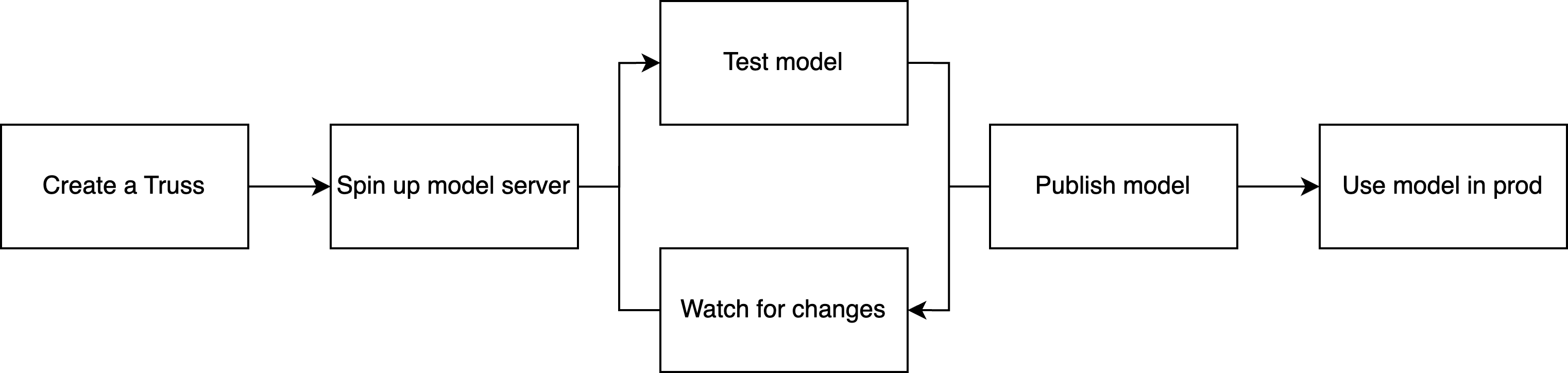
The development cycle
Whichever approach you choose, the development cycle is the same: create a development deployment, sync local changes, then publish an immutable deployment for production traffic.- Push to development. Run
baseten model push --watchto create a single-replica development deployment with live reload. - Iterate with live reload. Run
baseten model watchto sync local changes without rebuilding the container. Edit a file, save it, and review the result in the deployment logs. - Publish to production. Run
baseten model pushto create an immutable, production-ready deployment with full autoscaling. Promote it to an environment for a stable endpoint URL that doesn’t change between versions.