

View on GitHub
Install the client
- Python
- JavaScript
Install the Performance Client:
Get started
- Python
- JavaScript
To initialize the Performance Client in Python, import the class and provide your base URL and API key:
base_url.
Advanced setup
Configure HTTP version selection and connection pooling for optimal performance.- Python
- JavaScript
To configure HTTP version and connection pooling in Python, use the
http_version parameter and HttpClientWrapper:Core features
Embeddings
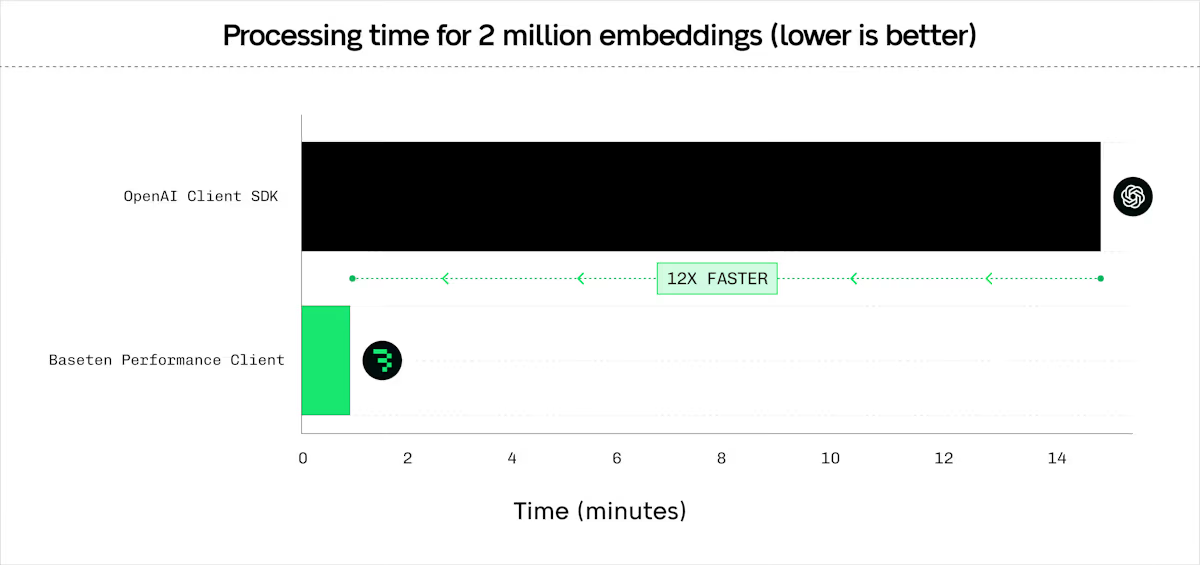
The client provides efficient embedding requests with configurable batching, concurrency, and latency optimizations. Compatible with BEI.- Python
- JavaScript
To generate embeddings with Python, configure a For async usage, call
RequestProcessingPreference and call client.embed():await client.async_embed(input=texts, model="my_model", preference=preference).Generic batch POST
Send HTTP requests to any URL with any JSON payload. Compatible with Engine-Builder-LLM and other models. Setstream=False for SSE endpoints.
- Python
- JavaScript
To send batch POST requests with Python, define your payloads and call Supported methods:
client.batch_post():GET, POST, PUT, PATCH, DELETE, HEAD, OPTIONS.For async usage, call await client.async_batch_post(url_path, payloads, preference, method).Reranking
Rerank documents by relevance to a query. Compatible with BEI, BEI-Bert, and text-embeddings-inference reranking endpoints.- Python
- JavaScript
To rerank documents with Python, provide a query and list of documents to For async usage, call
client.rerank():await client.async_rerank(query, texts, model, return_text, preference).Classification
Classify text inputs into categories. Compatible with BEI and text-embeddings-inference classification endpoints.- Python
- JavaScript
To classify text with Python, provide a list of inputs to For async usage, call
client.classify():await client.async_classify(inputs, model, preference).Advanced features
Configure RequestProcessingPreference
TheRequestProcessingPreference class provides unified configuration for all request processing parameters.
- Python
- JavaScript
To configure request processing in Python, create a
RequestProcessingPreference instance:Parameter reference
| Parameter | Type | Default | Range | Description |
|---|---|---|---|---|
max_concurrent_requests | int | 128 | 1-1024 | Maximum parallel requests |
batch_size | int | 128 | 1-1024 | Items per batch |
timeout_s | float | 3600.0 | 1.0-7200.0 | Per-request timeout in seconds |
hedge_delay | float | None | 0.2-30.0 | Hedge delay in seconds (see below) |
hedge_budget_pct | float | 0.10 | 0.0-3.0 | Percentage of requests allowed for hedging |
retry_budget_pct | float | 0.05 | 0.0-3.0 | Percentage of requests allowed for retries |
total_timeout_s | float | None | ≥timeout_s | Total operation timeout |
extra_headers | dict | None | - | Custom headers to include with all requests |
Select HTTP version
Choose between HTTP/1.1 and HTTP/2 for optimal performance. HTTP/1.1 is recommended for high concurrency workloads.- Python
- JavaScript
To select the HTTP version in Python, use the
http_version parameter:Share connection pools
Share connection pools across multiple client instances to reduce overhead when connecting to multiple endpoints.- Python
- JavaScript
To share a connection pool in Python, create an
HttpClientWrapper and pass it to each client:Cancel operations
Cancel long-running operations usingCancellationToken. The token provides immediate cancellation, resource cleanup, Ctrl+C support, token sharing across operations, and status checking with is_cancelled().
- Python
- JavaScript
To cancel operations in Python, create a
CancellationToken and pass it to your preference:Handle errors
The client raises standard exceptions for error conditions:HTTPError: Authentication failures (403), server errors (5xx), endpoint not found (404).Timeout: Request or total operation timeout based ontimeout_sortotal_timeout_s.ValueError: Invalid input parameters (empty input list, invalid batch size, inconsistent embedding dimensions).
- Python
- JavaScript
To handle errors in Python, catch the appropriate exception types:
Configure the client
Environment variables
BASETEN_API_KEY: Your Baseten API key. Also checksOPENAI_API_KEYas fallback.PERFORMANCE_CLIENT_LOG_LEVEL: Logging level. OverridesRUST_LOG. Valid values:trace,debug,info,warn,error. Default:warn.PERFORMANCE_CLIENT_REQUEST_ID_PREFIX: Custom prefix for request IDs. Default:perfclient.
Configure logging
To set the logging level, use thePERFORMANCE_CLIENT_LOG_LEVEL environment variable:
PERFORMANCE_CLIENT_LOG_LEVEL variable takes precedence over RUST_LOG.
Use with Rust
The Performance Client is also available as a native Rust library. To use the Performance Client in Rust, add the dependencies and create aPerformanceClientCore instance:
Cargo.toml:
Related
- GitHub: baseten-performance-client: Complete source code and additional examples.
- Performance benchmarks blog: Detailed performance analysis and comparisons.