> ## Documentation Index
> Fetch the complete documentation index at: https://docs.baseten.co/llms.txt
> Use this file to discover all available pages before exploring further.
# Performance client
> High-performance client library for embeddings, reranking, classification, and generic batch requests
Built in Rust and integrated with Python, Node.js, and native Rust, the *Performance Client* handles concurrent POST requests efficiently.
It releases the Python GIL while executing requests, enabling simultaneous sync and async usage.
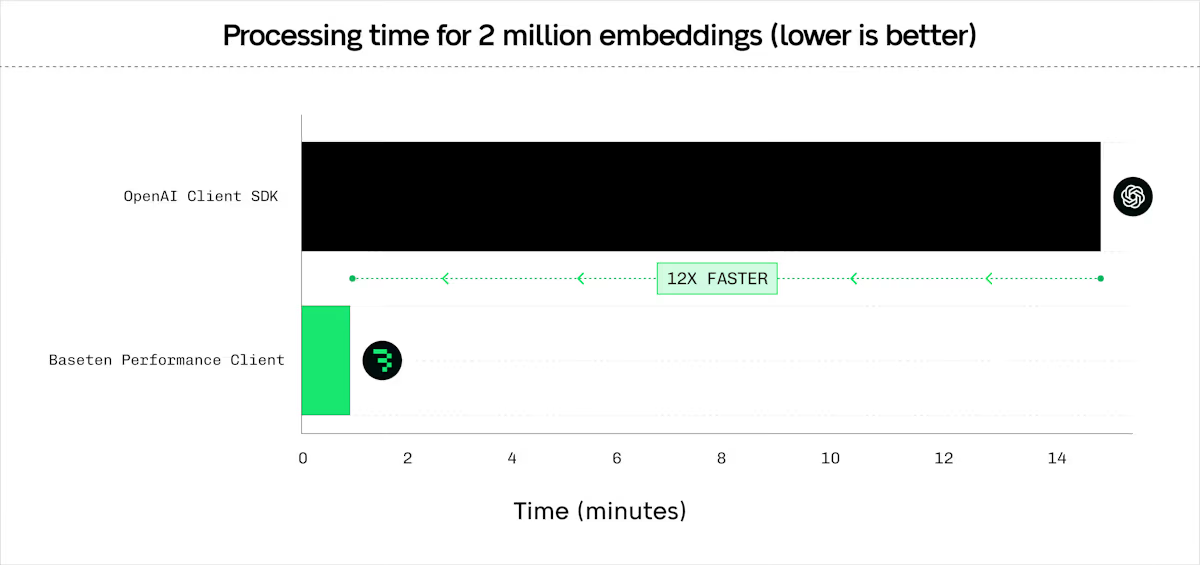
[Benchmarks](https://www.baseten.co/blog/your-client-code-matters-10x-higher-embedding-throughput-with-python-and-rust/) show the Performance Client reaches 1200+ requests per second per client.
Use it with **Baseten deployments** or **third-party providers** like OpenAI.
 ## Install the client
Install the Performance Client:
```bash Terminal theme={"system"}
uv pip install baseten_performance_client>=0.1.0
```
To install the Performance Client for JavaScript, use npm:
```bash Terminal theme={"system"}
npm install @basetenlabs/performance-client
```
## Get started
To initialize the Performance Client in Python, import the class and provide your base URL and API key:
```python quickstart.py theme={"system"}
from baseten_performance_client import PerformanceClient
client = PerformanceClient(
base_url="https://model-YOUR_MODEL_ID.api.baseten.co/environments/production/sync",
api_key="YOUR_API_KEY"
)
```
To initialize the Performance Client with JavaScript, require the package and create a new instance:
```javascript quickstart.js theme={"system"}
const { PerformanceClient } = require("@basetenlabs/performance-client");
const client = new PerformanceClient(
"https://model-YOUR_MODEL_ID.api.baseten.co/environments/production/sync",
process.env.BASETEN_API_KEY
);
```
The client also works with third-party providers like OpenAI by replacing the `base_url`.
### Advanced setup
Configure HTTP version selection and *connection pooling* for optimal performance.
To configure HTTP version and connection pooling in Python, use the `http_version` parameter and `HttpClientWrapper`:
```python advanced_setup.py theme={"system"}
from baseten_performance_client import PerformanceClient, HttpClientWrapper
# HTTP/1.1 (default, better for high concurrency)
client_http1 = PerformanceClient(BASE_URL, API_KEY, http_version=1)
# HTTP/2 (not recommended on Baseten)
client_http2 = PerformanceClient(BASE_URL, API_KEY, http_version=2)
# Connection pooling for multiple clients
wrapper = HttpClientWrapper(http_version=1)
client1 = PerformanceClient(base_url="https://api1.example.com", client_wrapper=wrapper)
client2 = PerformanceClient(base_url="https://api2.example.com", client_wrapper=wrapper)
```
To configure HTTP version and connection pooling with JavaScript, pass the version as the third argument and use `HttpClientWrapper`:
```javascript advanced_setup.js theme={"system"}
const { PerformanceClient, HttpClientWrapper } = require('@basetenlabs/performance-client');
// HTTP/1.1 (default, better for high concurrency)
const clientHttp1 = new PerformanceClient(BASE_URL, API_KEY, 1);
// HTTP/2
const clientHttp2 = new PerformanceClient(BASE_URL, API_KEY, 2);
// Connection pooling for multiple clients
const wrapper = new HttpClientWrapper(1);
const pooledClient1 = new PerformanceClient(BASE_URL_1, API_KEY, 1, wrapper);
const pooledClient2 = new PerformanceClient(BASE_URL_2, API_KEY, 1, wrapper);
```
## Core features
### Embeddings
The client provides efficient embedding requests with configurable *batching*, concurrency, and latency optimizations. Compatible with [BEI](/engines/bei/overview).
To generate embeddings with Python, configure a `RequestProcessingPreference` and call `client.embed()`:
```python embed.py theme={"system"}
from baseten_performance_client import PerformanceClient, RequestProcessingPreference
client = PerformanceClient(base_url=BASE_URL, api_key=API_KEY)
texts = ["Hello world", "Example text", "Another sample"] * 10
preference = RequestProcessingPreference(
batch_size=16,
max_concurrent_requests=256,
max_chars_per_request=10000,
hedge_delay=0.5,
timeout_s=360,
total_timeout_s=600,
extra_headers={"x-custom-header": "value"}
)
response = client.embed(
input=texts,
model="my_model",
preference=preference
)
print(f"Model used: {response.model}")
print(f"Total tokens used: {response.usage.total_tokens}")
print(f"Total time: {response.total_time:.4f}s")
# Convert to numpy array (requires numpy)
numpy_array = response.numpy()
print(f"Embeddings shape: {numpy_array.shape}")
```
For async usage, call `await client.async_embed(input=texts, model="my_model", preference=preference)`.
To generate embeddings with JavaScript, configure a `RequestProcessingPreference` and call `client.embed()`:
```javascript embed.js theme={"system"}
const { PerformanceClient, RequestProcessingPreference } = require('@basetenlabs/performance-client');
const client = new PerformanceClient(BASE_URL, API_KEY);
const texts = ["Hello world", "Example text", "Another sample"];
const preference = new RequestProcessingPreference(
32, // maxConcurrentRequests
4, // batchSize
360.0, // timeoutS
10000, // maxCharsPerRequest
0.5 // hedgeDelay
);
const response = await client.embed(
texts, // input
"my_model", // model
null, // encodingFormat
null, // dimensions
null, // user
preference // preference parameter
);
console.log(`Model used: ${response.model}`);
console.log(`Total tokens used: ${response.usage.total_tokens}`);
console.log(`Total time: ${response.total_time.toFixed(4)}s`);
```
### Generic batch POST
Send HTTP requests to any URL with any JSON payload. Compatible with [Engine-Builder-LLM](/engines/engine-builder-llm/overview) and other models. Set `stream=False` for SSE endpoints.
To send batch POST requests with Python, define your payloads and call `client.batch_post()`:
```python batch_post.py theme={"system"}
from baseten_performance_client import PerformanceClient, RequestProcessingPreference
client = PerformanceClient(base_url=BASE_URL, api_key=API_KEY)
payloads = [
{"model": "my_model", "prompt": "Batch request 1", "stream": False},
{"model": "my_model", "prompt": "Batch request 2", "stream": False}
] * 10
preference = RequestProcessingPreference(
max_concurrent_requests=96,
timeout_s=720,
hedge_delay=0.5,
extra_headers={"x-custom-header": "value"}
)
response = client.batch_post(
url_path="/v1/completions",
payloads=payloads,
preference=preference,
method="POST"
)
print(f"Total time: {response.total_time:.4f}s")
```
Supported methods: `GET`, `POST`, `PUT`, `PATCH`, `DELETE`, `HEAD`, `OPTIONS`.
For async usage, call `await client.async_batch_post(url_path, payloads, preference, method)`.
To send batch POST requests with JavaScript, define your payloads and call `client.batchPost()`:
```javascript batch_post.js theme={"system"}
const { PerformanceClient, RequestProcessingPreference } = require('@basetenlabs/performance-client');
const client = new PerformanceClient(BASE_URL, API_KEY);
const payloads = [
{ model: "my_model", prompt: "Batch request 1", stream: false },
{ model: "my_model", prompt: "Batch request 2", stream: false }
];
const preference = new RequestProcessingPreference(
32, // maxConcurrentRequests
undefined, // batchSize
360.0, // timeoutS
undefined, // maxCharsPerRequest
0.5 // hedgeDelay
);
const response = await client.batchPost(
"/v1/completions",
payloads,
preference,
"POST"
);
console.log(`Total time: ${response.total_time.toFixed(4)}s`);
```
### Reranking
Rerank documents by relevance to a query. Compatible with [BEI](/engines/bei/overview), [BEI-Bert](/engines/bei/overview), and text-embeddings-inference reranking endpoints.
To rerank documents with Python, provide a query and list of documents to `client.rerank()`:
```python rerank.py theme={"system"}
from baseten_performance_client import PerformanceClient, RequestProcessingPreference
client = PerformanceClient(base_url=BASE_URL, api_key=API_KEY)
query = "What is the best framework?"
documents = ["Doc 1 text", "Doc 2 text", "Doc 3 text"]
preference = RequestProcessingPreference(
batch_size=16,
max_concurrent_requests=32,
timeout_s=360,
max_chars_per_request=256000,
hedge_delay=0.5,
extra_headers={"x-rerank-header": "value"}
)
response = client.rerank(
query=query,
texts=documents,
model="rerank-model",
return_text=True,
preference=preference
)
for res in response.data:
print(f"Index: {res.index} Score: {res.score}")
```
For async usage, call `await client.async_rerank(query, texts, model, return_text, preference)`.
To rerank documents with JavaScript, provide a query and list of documents to `client.rerank()`:
```javascript rerank.js theme={"system"}
const { PerformanceClient, RequestProcessingPreference } = require('@basetenlabs/performance-client');
const client = new PerformanceClient(BASE_URL, API_KEY);
const query = "What is the best framework?";
const documents = ["Doc 1 text", "Doc 2 text", "Doc 3 text"];
const preference = new RequestProcessingPreference(
32, // maxConcurrentRequests
16, // batchSize
360.0, // timeoutS
undefined, // maxCharsPerRequest
0.5 // hedgeDelay
);
const response = await client.rerank(query, documents, "rerank-model", true, preference);
response.data.forEach(res => console.log(`Index: ${res.index} Score: ${res.score}`));
```
### Classification
Classify text inputs into categories. Compatible with [BEI](/engines/bei/overview) and text-embeddings-inference classification endpoints.
To classify text with Python, provide a list of inputs to `client.classify()`:
```python classify.py theme={"system"}
from baseten_performance_client import PerformanceClient, RequestProcessingPreference
client = PerformanceClient(base_url=BASE_URL, api_key=API_KEY)
texts_to_classify = [
"This is great!",
"I did not like it.",
"Neutral experience."
]
preference = RequestProcessingPreference(
batch_size=16,
max_concurrent_requests=32,
timeout_s=360.0,
max_chars_per_request=256000,
hedge_delay=0.5,
extra_headers={"x-classify-header": "value"}
)
response = client.classify(
inputs=texts_to_classify,
model="classification-model",
preference=preference
)
for group in response.data:
for result in group:
print(f"Label: {result.label}, Score: {result.score}")
```
For async usage, call `await client.async_classify(inputs, model, preference)`.
To classify text with JavaScript, provide a list of inputs to `client.classify()`:
```javascript classify.js theme={"system"}
const { PerformanceClient, RequestProcessingPreference } = require('@basetenlabs/performance-client');
const client = new PerformanceClient(BASE_URL, API_KEY);
const texts = ["This is great!", "I did not like it.", "Neutral experience."];
const preference = new RequestProcessingPreference(32, 16, 360.0, 256000, 0.5);
const response = await client.classify(texts, "classification-model", preference);
response.data.forEach(group => {
group.forEach(result => console.log(`Label: ${result.label}, Score: ${result.score}`));
});
```
## Advanced features
### Configure RequestProcessingPreference
The `RequestProcessingPreference` class provides unified configuration for all request processing parameters.
To configure request processing in Python, create a `RequestProcessingPreference` instance:
```python preference.py theme={"system"}
from baseten_performance_client import RequestProcessingPreference
preference = RequestProcessingPreference(
max_concurrent_requests=64,
batch_size=32,
timeout_s=30.0,
hedge_delay=0.5,
hedge_budget_pct=0.15,
retry_budget_pct=0.08,
max_retries=3,
initial_backoff_ms=250,
non_retryable_status_codes={529},
total_timeout_s=300.0
)
```
To configure request processing with JavaScript, create a `RequestProcessingPreference` instance:
```javascript preference.js theme={"system"}
const { RequestProcessingPreference } = require('@basetenlabs/performance-client');
const preference = new RequestProcessingPreference(
64, // maxConcurrentRequests
32, // batchSize
30.0, // timeoutS
undefined, // maxCharsPerRequest
0.5, // hedgeDelay
300.0, // totalTimeoutS
0.15, // hedgeBudgetPct
0.08, // retryBudgetPct
3, // maxRetries
250 // initialBackoffMs
);
```
#### Parameter reference
| Parameter | Type | Default | Range | Description |
| ---------------------------- | --------- | ------- | ----------- | ---------------------------------------------------------- |
| `max_concurrent_requests` | int | 128 | 1-1024 | Maximum parallel requests |
| `batch_size` | int | 128 | 1-1024 | Items per batch |
| `timeout_s` | float | 3600.0 | 1.0-7200.0 | Per-request timeout in seconds |
| `hedge_delay` | float | None | 0.2-30.0 | *Hedge delay* in seconds (see below) |
| `hedge_budget_pct` | float | 0.10 | 0.0-3.0 | Percentage of requests allowed for hedging |
| `retry_budget_pct` | float | 0.05 | 0.0-3.0 | Percentage of requests allowed for retries |
| `max_retries` | int | 5 | 0-6 | Maximum HTTP status-code retries per request |
| `initial_backoff_ms` | int | 125 | 50-45000 | Initial retry backoff in milliseconds |
| `non_retryable_status_codes` | Set\[int] | None | - | HTTP status codes to exclude from the default retry policy |
| `total_timeout_s` | float | None | ≥timeout\_s | Total operation timeout |
| `extra_headers` | dict | None | - | Custom headers to include with all requests |
*Hedge delay* sends duplicate requests after a specified delay to reduce p99 latency. After the delay, the request is cloned and raced against the original. The 429 and 5xx errors are always retried automatically.
#### Retry configuration
HTTP status-code retries are controlled by `max_retries` (`maxRetries` in JavaScript), which is separate from `retry_budget_pct`. By default, `408`, `409`, `429`, and `500` through `599` are retried. Set `max_retries` to 0 to disable these retries.
Use `non_retryable_status_codes` (`nonRetryableStatusCodes` in JavaScript) to opt specific status codes out of the default policy. For example, pass `{529}` in Python or `[529]` in JavaScript to stop retrying 529 responses.
Backoff starts at `initial_backoff_ms` (`initialBackoffMs` in JavaScript), multiplies by 4 after each retry, caps at 45000 milliseconds, and adds up to 99 milliseconds of jitter.
### Select HTTP version
HTTP/1.1 is recommended for high concurrency workloads.
To select the HTTP version in Python, use the `http_version` parameter:
```python http_version.py theme={"system"}
from baseten_performance_client import PerformanceClient
# HTTP/1.1 (default, better for high concurrency)
client_http1 = PerformanceClient(BASE_URL, API_KEY, http_version=1)
# HTTP/2 (better for single requests)
client_http2 = PerformanceClient(BASE_URL, API_KEY, http_version=2)
```
To select the HTTP version with JavaScript, pass the version as the third argument:
```javascript http_version.js theme={"system"}
const { PerformanceClient } = require('@basetenlabs/performance-client');
// HTTP/1.1 (default, better for high concurrency)
const clientHttp1 = new PerformanceClient(BASE_URL, API_KEY, 1);
// HTTP/2 (better for single requests)
const clientHttp2 = new PerformanceClient(BASE_URL, API_KEY, 2);
```
### Share connection pools
Share connection pools across multiple client instances to reduce overhead when connecting to multiple endpoints.
To share a connection pool in Python, create an `HttpClientWrapper` and pass it to each client:
```python shared_pool.py theme={"system"}
from baseten_performance_client import PerformanceClient, HttpClientWrapper
wrapper = HttpClientWrapper(http_version=1)
client1 = PerformanceClient(base_url="https://api1.example.com", client_wrapper=wrapper)
client2 = PerformanceClient(base_url="https://api2.example.com", client_wrapper=wrapper)
```
To share a connection pool with JavaScript, create an `HttpClientWrapper` and pass it to each client:
```javascript shared_pool.js theme={"system"}
const { PerformanceClient, HttpClientWrapper } = require('@basetenlabs/performance-client');
const wrapper = new HttpClientWrapper(1);
const client1 = new PerformanceClient(BASE_URL_1, API_KEY, 1, wrapper);
const client2 = new PerformanceClient(BASE_URL_2, API_KEY, 1, wrapper);
```
### Cancel operations
Cancel long-running operations using `CancellationToken`. The token provides immediate cancellation, resource cleanup, Ctrl+C support, token sharing across operations, and status checking with `is_cancelled()`.
To cancel operations in Python, create a `CancellationToken` and pass it to your preference:
```python cancel.py theme={"system"}
from baseten_performance_client import (
PerformanceClient,
CancellationToken,
RequestProcessingPreference
)
import threading
import time
client = PerformanceClient(base_url=BASE_URL, api_key=API_KEY)
cancel_token = CancellationToken()
preference = RequestProcessingPreference(
max_concurrent_requests=32,
batch_size=16,
timeout_s=360.0,
cancel_token=cancel_token
)
def long_operation():
try:
response = client.embed(
input=["large batch"] * 1000,
model="embedding-model",
preference=preference
)
print("Operation completed")
except ValueError as e:
if "cancelled" in str(e):
print("Operation was cancelled")
threading.Thread(target=long_operation).start()
time.sleep(2)
cancel_token.cancel()
```
To cancel operations with JavaScript, create a `CancellationToken` and pass it to your preference:
```javascript cancel.js theme={"system"}
const { PerformanceClient, CancellationToken, RequestProcessingPreference } = require('@basetenlabs/performance-client');
const client = new PerformanceClient(BASE_URL, API_KEY);
const cancelToken = new CancellationToken();
const preference = new RequestProcessingPreference(
32, 16, 360.0, undefined, undefined, undefined,
undefined, undefined, undefined, undefined, cancelToken
);
const operation = client.embed(
["large batch"].concat(Array(1000).fill("sample")),
"model",
undefined,
undefined,
undefined,
preference
);
setTimeout(() => cancelToken.cancel(), 2000);
try {
const response = await operation;
console.log("Operation completed");
} catch (error) {
if (error.message.includes("cancelled")) {
console.log("Operation was cancelled");
}
}
```
## Handle errors
The client raises standard exceptions for error conditions:
* **`HTTPError`**: Authentication failures (403), server errors (5xx), endpoint not found (404).
* **`Timeout`**: Request or total operation timeout based on `timeout_s` or `total_timeout_s`.
* **`ValueError`**: Invalid input parameters (empty input list, invalid batch size, inconsistent embedding dimensions).
To handle errors in Python, catch the appropriate exception types:
```python handle_errors.py theme={"system"}
import requests
from baseten_performance_client import PerformanceClient, RequestProcessingPreference
client = PerformanceClient(base_url=BASE_URL, api_key=API_KEY)
preference = RequestProcessingPreference(timeout_s=30.0)
try:
response = client.embed(input=["text"], model="model", preference=preference)
print(f"Model used: {response.model}")
except requests.exceptions.HTTPError as e:
print(f"HTTP error: {e}, status code: {e.response.status_code}")
except requests.exceptions.Timeout as e:
print(f"Timeout error: {e}")
except ValueError as e:
print(f"Input error: {e}")
```
To handle errors with JavaScript, use a try-catch block and inspect the error object:
```javascript handle_errors.js theme={"system"}
const { PerformanceClient, RequestProcessingPreference } = require('@basetenlabs/performance-client');
const client = new PerformanceClient(BASE_URL, API_KEY);
const preference = new RequestProcessingPreference(undefined, undefined, 30.0);
try {
const response = await client.embed(texts, "model", undefined, undefined, undefined, preference);
console.log("Success:", response.model);
} catch (error) {
if (error.response) {
console.log(`HTTP error: ${error.response.status}`);
} else if (error.code === 'TIMEOUT') {
console.log("Timeout error");
} else {
console.log(`Error: ${error.message}`);
}
}
```
## Configure the client
### Environment variables
* **`BASETEN_API_KEY`**: Your Baseten API key. Also checks `OPENAI_API_KEY` as fallback.
* **`PERFORMANCE_CLIENT_LOG_LEVEL`**: Logging level. Overrides `RUST_LOG`. Valid values: `trace`, `debug`, `info`, `warn`, `error`. Default: `warn`.
* **`PERFORMANCE_CLIENT_REQUEST_ID_PREFIX`**: Custom prefix for request IDs. Default: `perfclient`.
### Configure logging
To set the logging level, use the `PERFORMANCE_CLIENT_LOG_LEVEL` environment variable:
```bash Terminal theme={"system"}
PERFORMANCE_CLIENT_LOG_LEVEL=info python script.py
PERFORMANCE_CLIENT_LOG_LEVEL=debug cargo run
```
The `PERFORMANCE_CLIENT_LOG_LEVEL` variable takes precedence over `RUST_LOG`.
## Use with Rust
The Performance Client is also available as a native Rust library.
To use the Performance Client in Rust, add the dependencies and create a `PerformanceClientCore` instance:
```rust main.rs theme={"system"}
use baseten_performance_client_core::{PerformanceClientCore, ClientError};
use tokio;
#[tokio::main]
async fn main() -> Result<(), Box> {
let api_key = std::env::var("BASETEN_API_KEY").expect("BASETEN_API_KEY not set");
let base_url = "https://model-YOUR_MODEL_ID.api.baseten.co/environments/production/sync";
let client = PerformanceClientCore::new(base_url, Some(api_key), None, None);
// Generate embeddings
let texts = vec!["Hello world".to_string(), "Example text".to_string()];
let embedding_response = client.embed(
texts,
"my_model".to_string(),
Some(16),
Some(32),
Some(360.0),
Some(256000),
Some(0.5),
Some(360.0),
).await?;
println!("Model: {}", embedding_response.model);
println!("Total tokens: {}", embedding_response.usage.total_tokens);
// Send batch POST requests
let payloads = vec![
serde_json::json!({"model": "my_model", "input": ["Rust sample 1"]}),
serde_json::json!({"model": "my_model", "input": ["Rust sample 2"]}),
];
let batch_response = client.batch_post(
"/v1/embeddings".to_string(),
payloads,
Some(32),
Some(360.0),
Some(0.5),
Some(360.0),
None,
).await?;
println!("Batch POST total time: {:.4}s", batch_response.total_time);
Ok(())
}
```
Add these dependencies to your `Cargo.toml`:
```toml Cargo.toml theme={"system"}
[dependencies]
baseten_performance_client_core = "0.1.4"
tokio = { version = "1.0", features = ["full"] }
serde_json = "1.0"
```
## Related
* [GitHub: baseten-performance-client](https://github.com/basetenlabs/truss/tree/main/baseten-performance-client): Complete source code and additional examples.
* [Performance benchmarks blog](https://www.baseten.co/blog/your-client-code-matters-10x-higher-embedding-throughput-with-python-and-rust/): Detailed performance analysis and comparisons.
## Install the client
Install the Performance Client:
```bash Terminal theme={"system"}
uv pip install baseten_performance_client>=0.1.0
```
To install the Performance Client for JavaScript, use npm:
```bash Terminal theme={"system"}
npm install @basetenlabs/performance-client
```
## Get started
To initialize the Performance Client in Python, import the class and provide your base URL and API key:
```python quickstart.py theme={"system"}
from baseten_performance_client import PerformanceClient
client = PerformanceClient(
base_url="https://model-YOUR_MODEL_ID.api.baseten.co/environments/production/sync",
api_key="YOUR_API_KEY"
)
```
To initialize the Performance Client with JavaScript, require the package and create a new instance:
```javascript quickstart.js theme={"system"}
const { PerformanceClient } = require("@basetenlabs/performance-client");
const client = new PerformanceClient(
"https://model-YOUR_MODEL_ID.api.baseten.co/environments/production/sync",
process.env.BASETEN_API_KEY
);
```
The client also works with third-party providers like OpenAI by replacing the `base_url`.
### Advanced setup
Configure HTTP version selection and *connection pooling* for optimal performance.
To configure HTTP version and connection pooling in Python, use the `http_version` parameter and `HttpClientWrapper`:
```python advanced_setup.py theme={"system"}
from baseten_performance_client import PerformanceClient, HttpClientWrapper
# HTTP/1.1 (default, better for high concurrency)
client_http1 = PerformanceClient(BASE_URL, API_KEY, http_version=1)
# HTTP/2 (not recommended on Baseten)
client_http2 = PerformanceClient(BASE_URL, API_KEY, http_version=2)
# Connection pooling for multiple clients
wrapper = HttpClientWrapper(http_version=1)
client1 = PerformanceClient(base_url="https://api1.example.com", client_wrapper=wrapper)
client2 = PerformanceClient(base_url="https://api2.example.com", client_wrapper=wrapper)
```
To configure HTTP version and connection pooling with JavaScript, pass the version as the third argument and use `HttpClientWrapper`:
```javascript advanced_setup.js theme={"system"}
const { PerformanceClient, HttpClientWrapper } = require('@basetenlabs/performance-client');
// HTTP/1.1 (default, better for high concurrency)
const clientHttp1 = new PerformanceClient(BASE_URL, API_KEY, 1);
// HTTP/2
const clientHttp2 = new PerformanceClient(BASE_URL, API_KEY, 2);
// Connection pooling for multiple clients
const wrapper = new HttpClientWrapper(1);
const pooledClient1 = new PerformanceClient(BASE_URL_1, API_KEY, 1, wrapper);
const pooledClient2 = new PerformanceClient(BASE_URL_2, API_KEY, 1, wrapper);
```
## Core features
### Embeddings
The client provides efficient embedding requests with configurable *batching*, concurrency, and latency optimizations. Compatible with [BEI](/engines/bei/overview).
To generate embeddings with Python, configure a `RequestProcessingPreference` and call `client.embed()`:
```python embed.py theme={"system"}
from baseten_performance_client import PerformanceClient, RequestProcessingPreference
client = PerformanceClient(base_url=BASE_URL, api_key=API_KEY)
texts = ["Hello world", "Example text", "Another sample"] * 10
preference = RequestProcessingPreference(
batch_size=16,
max_concurrent_requests=256,
max_chars_per_request=10000,
hedge_delay=0.5,
timeout_s=360,
total_timeout_s=600,
extra_headers={"x-custom-header": "value"}
)
response = client.embed(
input=texts,
model="my_model",
preference=preference
)
print(f"Model used: {response.model}")
print(f"Total tokens used: {response.usage.total_tokens}")
print(f"Total time: {response.total_time:.4f}s")
# Convert to numpy array (requires numpy)
numpy_array = response.numpy()
print(f"Embeddings shape: {numpy_array.shape}")
```
For async usage, call `await client.async_embed(input=texts, model="my_model", preference=preference)`.
To generate embeddings with JavaScript, configure a `RequestProcessingPreference` and call `client.embed()`:
```javascript embed.js theme={"system"}
const { PerformanceClient, RequestProcessingPreference } = require('@basetenlabs/performance-client');
const client = new PerformanceClient(BASE_URL, API_KEY);
const texts = ["Hello world", "Example text", "Another sample"];
const preference = new RequestProcessingPreference(
32, // maxConcurrentRequests
4, // batchSize
360.0, // timeoutS
10000, // maxCharsPerRequest
0.5 // hedgeDelay
);
const response = await client.embed(
texts, // input
"my_model", // model
null, // encodingFormat
null, // dimensions
null, // user
preference // preference parameter
);
console.log(`Model used: ${response.model}`);
console.log(`Total tokens used: ${response.usage.total_tokens}`);
console.log(`Total time: ${response.total_time.toFixed(4)}s`);
```
### Generic batch POST
Send HTTP requests to any URL with any JSON payload. Compatible with [Engine-Builder-LLM](/engines/engine-builder-llm/overview) and other models. Set `stream=False` for SSE endpoints.
To send batch POST requests with Python, define your payloads and call `client.batch_post()`:
```python batch_post.py theme={"system"}
from baseten_performance_client import PerformanceClient, RequestProcessingPreference
client = PerformanceClient(base_url=BASE_URL, api_key=API_KEY)
payloads = [
{"model": "my_model", "prompt": "Batch request 1", "stream": False},
{"model": "my_model", "prompt": "Batch request 2", "stream": False}
] * 10
preference = RequestProcessingPreference(
max_concurrent_requests=96,
timeout_s=720,
hedge_delay=0.5,
extra_headers={"x-custom-header": "value"}
)
response = client.batch_post(
url_path="/v1/completions",
payloads=payloads,
preference=preference,
method="POST"
)
print(f"Total time: {response.total_time:.4f}s")
```
Supported methods: `GET`, `POST`, `PUT`, `PATCH`, `DELETE`, `HEAD`, `OPTIONS`.
For async usage, call `await client.async_batch_post(url_path, payloads, preference, method)`.
To send batch POST requests with JavaScript, define your payloads and call `client.batchPost()`:
```javascript batch_post.js theme={"system"}
const { PerformanceClient, RequestProcessingPreference } = require('@basetenlabs/performance-client');
const client = new PerformanceClient(BASE_URL, API_KEY);
const payloads = [
{ model: "my_model", prompt: "Batch request 1", stream: false },
{ model: "my_model", prompt: "Batch request 2", stream: false }
];
const preference = new RequestProcessingPreference(
32, // maxConcurrentRequests
undefined, // batchSize
360.0, // timeoutS
undefined, // maxCharsPerRequest
0.5 // hedgeDelay
);
const response = await client.batchPost(
"/v1/completions",
payloads,
preference,
"POST"
);
console.log(`Total time: ${response.total_time.toFixed(4)}s`);
```
### Reranking
Rerank documents by relevance to a query. Compatible with [BEI](/engines/bei/overview), [BEI-Bert](/engines/bei/overview), and text-embeddings-inference reranking endpoints.
To rerank documents with Python, provide a query and list of documents to `client.rerank()`:
```python rerank.py theme={"system"}
from baseten_performance_client import PerformanceClient, RequestProcessingPreference
client = PerformanceClient(base_url=BASE_URL, api_key=API_KEY)
query = "What is the best framework?"
documents = ["Doc 1 text", "Doc 2 text", "Doc 3 text"]
preference = RequestProcessingPreference(
batch_size=16,
max_concurrent_requests=32,
timeout_s=360,
max_chars_per_request=256000,
hedge_delay=0.5,
extra_headers={"x-rerank-header": "value"}
)
response = client.rerank(
query=query,
texts=documents,
model="rerank-model",
return_text=True,
preference=preference
)
for res in response.data:
print(f"Index: {res.index} Score: {res.score}")
```
For async usage, call `await client.async_rerank(query, texts, model, return_text, preference)`.
To rerank documents with JavaScript, provide a query and list of documents to `client.rerank()`:
```javascript rerank.js theme={"system"}
const { PerformanceClient, RequestProcessingPreference } = require('@basetenlabs/performance-client');
const client = new PerformanceClient(BASE_URL, API_KEY);
const query = "What is the best framework?";
const documents = ["Doc 1 text", "Doc 2 text", "Doc 3 text"];
const preference = new RequestProcessingPreference(
32, // maxConcurrentRequests
16, // batchSize
360.0, // timeoutS
undefined, // maxCharsPerRequest
0.5 // hedgeDelay
);
const response = await client.rerank(query, documents, "rerank-model", true, preference);
response.data.forEach(res => console.log(`Index: ${res.index} Score: ${res.score}`));
```
### Classification
Classify text inputs into categories. Compatible with [BEI](/engines/bei/overview) and text-embeddings-inference classification endpoints.
To classify text with Python, provide a list of inputs to `client.classify()`:
```python classify.py theme={"system"}
from baseten_performance_client import PerformanceClient, RequestProcessingPreference
client = PerformanceClient(base_url=BASE_URL, api_key=API_KEY)
texts_to_classify = [
"This is great!",
"I did not like it.",
"Neutral experience."
]
preference = RequestProcessingPreference(
batch_size=16,
max_concurrent_requests=32,
timeout_s=360.0,
max_chars_per_request=256000,
hedge_delay=0.5,
extra_headers={"x-classify-header": "value"}
)
response = client.classify(
inputs=texts_to_classify,
model="classification-model",
preference=preference
)
for group in response.data:
for result in group:
print(f"Label: {result.label}, Score: {result.score}")
```
For async usage, call `await client.async_classify(inputs, model, preference)`.
To classify text with JavaScript, provide a list of inputs to `client.classify()`:
```javascript classify.js theme={"system"}
const { PerformanceClient, RequestProcessingPreference } = require('@basetenlabs/performance-client');
const client = new PerformanceClient(BASE_URL, API_KEY);
const texts = ["This is great!", "I did not like it.", "Neutral experience."];
const preference = new RequestProcessingPreference(32, 16, 360.0, 256000, 0.5);
const response = await client.classify(texts, "classification-model", preference);
response.data.forEach(group => {
group.forEach(result => console.log(`Label: ${result.label}, Score: ${result.score}`));
});
```
## Advanced features
### Configure RequestProcessingPreference
The `RequestProcessingPreference` class provides unified configuration for all request processing parameters.
To configure request processing in Python, create a `RequestProcessingPreference` instance:
```python preference.py theme={"system"}
from baseten_performance_client import RequestProcessingPreference
preference = RequestProcessingPreference(
max_concurrent_requests=64,
batch_size=32,
timeout_s=30.0,
hedge_delay=0.5,
hedge_budget_pct=0.15,
retry_budget_pct=0.08,
max_retries=3,
initial_backoff_ms=250,
non_retryable_status_codes={529},
total_timeout_s=300.0
)
```
To configure request processing with JavaScript, create a `RequestProcessingPreference` instance:
```javascript preference.js theme={"system"}
const { RequestProcessingPreference } = require('@basetenlabs/performance-client');
const preference = new RequestProcessingPreference(
64, // maxConcurrentRequests
32, // batchSize
30.0, // timeoutS
undefined, // maxCharsPerRequest
0.5, // hedgeDelay
300.0, // totalTimeoutS
0.15, // hedgeBudgetPct
0.08, // retryBudgetPct
3, // maxRetries
250 // initialBackoffMs
);
```
#### Parameter reference
| Parameter | Type | Default | Range | Description |
| ---------------------------- | --------- | ------- | ----------- | ---------------------------------------------------------- |
| `max_concurrent_requests` | int | 128 | 1-1024 | Maximum parallel requests |
| `batch_size` | int | 128 | 1-1024 | Items per batch |
| `timeout_s` | float | 3600.0 | 1.0-7200.0 | Per-request timeout in seconds |
| `hedge_delay` | float | None | 0.2-30.0 | *Hedge delay* in seconds (see below) |
| `hedge_budget_pct` | float | 0.10 | 0.0-3.0 | Percentage of requests allowed for hedging |
| `retry_budget_pct` | float | 0.05 | 0.0-3.0 | Percentage of requests allowed for retries |
| `max_retries` | int | 5 | 0-6 | Maximum HTTP status-code retries per request |
| `initial_backoff_ms` | int | 125 | 50-45000 | Initial retry backoff in milliseconds |
| `non_retryable_status_codes` | Set\[int] | None | - | HTTP status codes to exclude from the default retry policy |
| `total_timeout_s` | float | None | ≥timeout\_s | Total operation timeout |
| `extra_headers` | dict | None | - | Custom headers to include with all requests |
*Hedge delay* sends duplicate requests after a specified delay to reduce p99 latency. After the delay, the request is cloned and raced against the original. The 429 and 5xx errors are always retried automatically.
#### Retry configuration
HTTP status-code retries are controlled by `max_retries` (`maxRetries` in JavaScript), which is separate from `retry_budget_pct`. By default, `408`, `409`, `429`, and `500` through `599` are retried. Set `max_retries` to 0 to disable these retries.
Use `non_retryable_status_codes` (`nonRetryableStatusCodes` in JavaScript) to opt specific status codes out of the default policy. For example, pass `{529}` in Python or `[529]` in JavaScript to stop retrying 529 responses.
Backoff starts at `initial_backoff_ms` (`initialBackoffMs` in JavaScript), multiplies by 4 after each retry, caps at 45000 milliseconds, and adds up to 99 milliseconds of jitter.
### Select HTTP version
HTTP/1.1 is recommended for high concurrency workloads.
To select the HTTP version in Python, use the `http_version` parameter:
```python http_version.py theme={"system"}
from baseten_performance_client import PerformanceClient
# HTTP/1.1 (default, better for high concurrency)
client_http1 = PerformanceClient(BASE_URL, API_KEY, http_version=1)
# HTTP/2 (better for single requests)
client_http2 = PerformanceClient(BASE_URL, API_KEY, http_version=2)
```
To select the HTTP version with JavaScript, pass the version as the third argument:
```javascript http_version.js theme={"system"}
const { PerformanceClient } = require('@basetenlabs/performance-client');
// HTTP/1.1 (default, better for high concurrency)
const clientHttp1 = new PerformanceClient(BASE_URL, API_KEY, 1);
// HTTP/2 (better for single requests)
const clientHttp2 = new PerformanceClient(BASE_URL, API_KEY, 2);
```
### Share connection pools
Share connection pools across multiple client instances to reduce overhead when connecting to multiple endpoints.
To share a connection pool in Python, create an `HttpClientWrapper` and pass it to each client:
```python shared_pool.py theme={"system"}
from baseten_performance_client import PerformanceClient, HttpClientWrapper
wrapper = HttpClientWrapper(http_version=1)
client1 = PerformanceClient(base_url="https://api1.example.com", client_wrapper=wrapper)
client2 = PerformanceClient(base_url="https://api2.example.com", client_wrapper=wrapper)
```
To share a connection pool with JavaScript, create an `HttpClientWrapper` and pass it to each client:
```javascript shared_pool.js theme={"system"}
const { PerformanceClient, HttpClientWrapper } = require('@basetenlabs/performance-client');
const wrapper = new HttpClientWrapper(1);
const client1 = new PerformanceClient(BASE_URL_1, API_KEY, 1, wrapper);
const client2 = new PerformanceClient(BASE_URL_2, API_KEY, 1, wrapper);
```
### Cancel operations
Cancel long-running operations using `CancellationToken`. The token provides immediate cancellation, resource cleanup, Ctrl+C support, token sharing across operations, and status checking with `is_cancelled()`.
To cancel operations in Python, create a `CancellationToken` and pass it to your preference:
```python cancel.py theme={"system"}
from baseten_performance_client import (
PerformanceClient,
CancellationToken,
RequestProcessingPreference
)
import threading
import time
client = PerformanceClient(base_url=BASE_URL, api_key=API_KEY)
cancel_token = CancellationToken()
preference = RequestProcessingPreference(
max_concurrent_requests=32,
batch_size=16,
timeout_s=360.0,
cancel_token=cancel_token
)
def long_operation():
try:
response = client.embed(
input=["large batch"] * 1000,
model="embedding-model",
preference=preference
)
print("Operation completed")
except ValueError as e:
if "cancelled" in str(e):
print("Operation was cancelled")
threading.Thread(target=long_operation).start()
time.sleep(2)
cancel_token.cancel()
```
To cancel operations with JavaScript, create a `CancellationToken` and pass it to your preference:
```javascript cancel.js theme={"system"}
const { PerformanceClient, CancellationToken, RequestProcessingPreference } = require('@basetenlabs/performance-client');
const client = new PerformanceClient(BASE_URL, API_KEY);
const cancelToken = new CancellationToken();
const preference = new RequestProcessingPreference(
32, 16, 360.0, undefined, undefined, undefined,
undefined, undefined, undefined, undefined, cancelToken
);
const operation = client.embed(
["large batch"].concat(Array(1000).fill("sample")),
"model",
undefined,
undefined,
undefined,
preference
);
setTimeout(() => cancelToken.cancel(), 2000);
try {
const response = await operation;
console.log("Operation completed");
} catch (error) {
if (error.message.includes("cancelled")) {
console.log("Operation was cancelled");
}
}
```
## Handle errors
The client raises standard exceptions for error conditions:
* **`HTTPError`**: Authentication failures (403), server errors (5xx), endpoint not found (404).
* **`Timeout`**: Request or total operation timeout based on `timeout_s` or `total_timeout_s`.
* **`ValueError`**: Invalid input parameters (empty input list, invalid batch size, inconsistent embedding dimensions).
To handle errors in Python, catch the appropriate exception types:
```python handle_errors.py theme={"system"}
import requests
from baseten_performance_client import PerformanceClient, RequestProcessingPreference
client = PerformanceClient(base_url=BASE_URL, api_key=API_KEY)
preference = RequestProcessingPreference(timeout_s=30.0)
try:
response = client.embed(input=["text"], model="model", preference=preference)
print(f"Model used: {response.model}")
except requests.exceptions.HTTPError as e:
print(f"HTTP error: {e}, status code: {e.response.status_code}")
except requests.exceptions.Timeout as e:
print(f"Timeout error: {e}")
except ValueError as e:
print(f"Input error: {e}")
```
To handle errors with JavaScript, use a try-catch block and inspect the error object:
```javascript handle_errors.js theme={"system"}
const { PerformanceClient, RequestProcessingPreference } = require('@basetenlabs/performance-client');
const client = new PerformanceClient(BASE_URL, API_KEY);
const preference = new RequestProcessingPreference(undefined, undefined, 30.0);
try {
const response = await client.embed(texts, "model", undefined, undefined, undefined, preference);
console.log("Success:", response.model);
} catch (error) {
if (error.response) {
console.log(`HTTP error: ${error.response.status}`);
} else if (error.code === 'TIMEOUT') {
console.log("Timeout error");
} else {
console.log(`Error: ${error.message}`);
}
}
```
## Configure the client
### Environment variables
* **`BASETEN_API_KEY`**: Your Baseten API key. Also checks `OPENAI_API_KEY` as fallback.
* **`PERFORMANCE_CLIENT_LOG_LEVEL`**: Logging level. Overrides `RUST_LOG`. Valid values: `trace`, `debug`, `info`, `warn`, `error`. Default: `warn`.
* **`PERFORMANCE_CLIENT_REQUEST_ID_PREFIX`**: Custom prefix for request IDs. Default: `perfclient`.
### Configure logging
To set the logging level, use the `PERFORMANCE_CLIENT_LOG_LEVEL` environment variable:
```bash Terminal theme={"system"}
PERFORMANCE_CLIENT_LOG_LEVEL=info python script.py
PERFORMANCE_CLIENT_LOG_LEVEL=debug cargo run
```
The `PERFORMANCE_CLIENT_LOG_LEVEL` variable takes precedence over `RUST_LOG`.
## Use with Rust
The Performance Client is also available as a native Rust library.
To use the Performance Client in Rust, add the dependencies and create a `PerformanceClientCore` instance:
```rust main.rs theme={"system"}
use baseten_performance_client_core::{PerformanceClientCore, ClientError};
use tokio;
#[tokio::main]
async fn main() -> Result<(), Box> {
let api_key = std::env::var("BASETEN_API_KEY").expect("BASETEN_API_KEY not set");
let base_url = "https://model-YOUR_MODEL_ID.api.baseten.co/environments/production/sync";
let client = PerformanceClientCore::new(base_url, Some(api_key), None, None);
// Generate embeddings
let texts = vec!["Hello world".to_string(), "Example text".to_string()];
let embedding_response = client.embed(
texts,
"my_model".to_string(),
Some(16),
Some(32),
Some(360.0),
Some(256000),
Some(0.5),
Some(360.0),
).await?;
println!("Model: {}", embedding_response.model);
println!("Total tokens: {}", embedding_response.usage.total_tokens);
// Send batch POST requests
let payloads = vec![
serde_json::json!({"model": "my_model", "input": ["Rust sample 1"]}),
serde_json::json!({"model": "my_model", "input": ["Rust sample 2"]}),
];
let batch_response = client.batch_post(
"/v1/embeddings".to_string(),
payloads,
Some(32),
Some(360.0),
Some(0.5),
Some(360.0),
None,
).await?;
println!("Batch POST total time: {:.4}s", batch_response.total_time);
Ok(())
}
```
Add these dependencies to your `Cargo.toml`:
```toml Cargo.toml theme={"system"}
[dependencies]
baseten_performance_client_core = "0.1.4"
tokio = { version = "1.0", features = ["full"] }
serde_json = "1.0"
```
## Related
* [GitHub: baseten-performance-client](https://github.com/basetenlabs/truss/tree/main/baseten-performance-client): Complete source code and additional examples.
* [Performance benchmarks blog](https://www.baseten.co/blog/your-client-code-matters-10x-higher-embedding-throughput-with-python-and-rust/): Detailed performance analysis and comparisons.