> ## Documentation Index
> Fetch the complete documentation index at: https://docs.baseten.co/llms.txt
> Use this file to discover all available pages before exploring further.
# Voice inference performance
> Measure speech latency and quality, choose concurrency targets, and evaluate deployment cost under representative traffic.
Choose per-replica concurrency by measuring speech latency under the traffic you expect to serve. Compare configurations that meet your quality and latency targets, then calculate cost using achieved throughput and utilization.
Open your model's **Metrics** view and select the deployment and time range for your test.
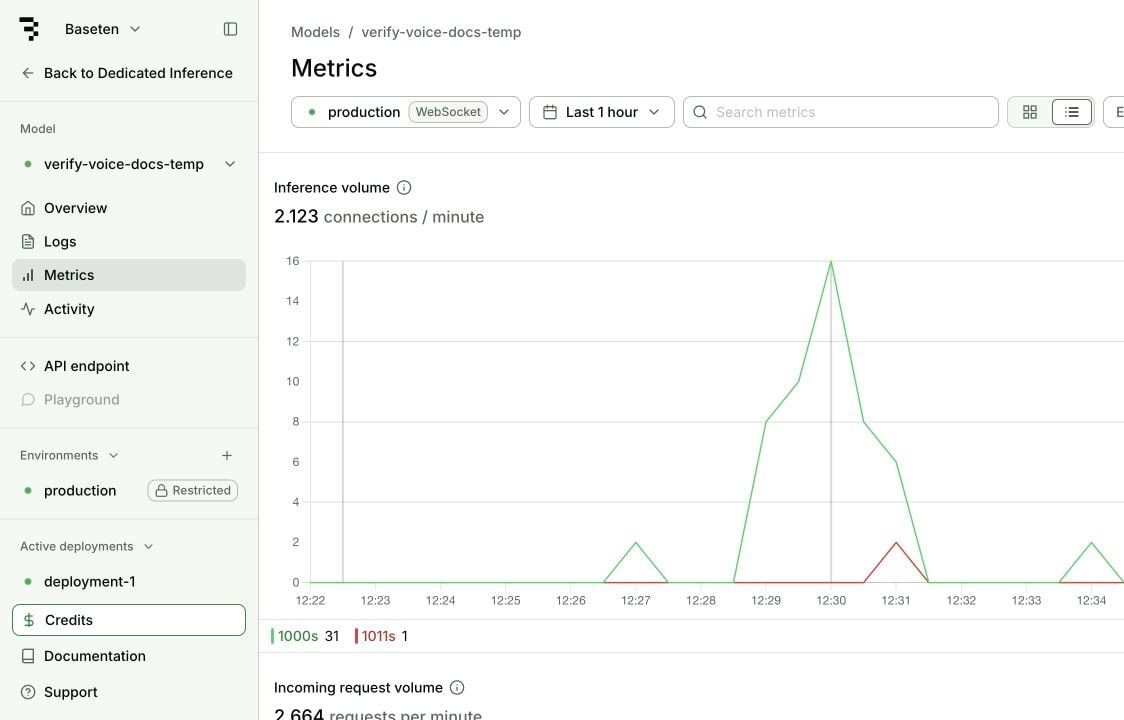 Start with **Ongoing websocket connections** and **Replicas** to understand load. Use **Inference volume** to inspect how connections ended, and **End-to-end connection duration** to measure their lifetimes. A normal close code confirms transport cleanup; use the model's final-flush signal to confirm transcription completion. A long connection can contain many short turns. Measure each turn in your client to find the delay your application experiences.
## Workload evaluation
Choose measurements that match how your application sends and receives audio:
| Workflow | Representative input | Measurements |
| - | - | - |
| Batch transcription | Complete recordings with the recording-length distribution you expect in production. | Processing time, audio duration, real-time factor, and transcription quality. |
| Real-time transcription | Sessions with representative lengths, speech, silence, and concurrent connections. | Time to first partial, finalization after speech ends, and transcription quality. |
| Streaming speech generation | Text with representative lengths, languages, and voice settings. | Time to first audio, playback start, and stalls during playback. |
| Batch speech generation | Text with representative lengths, languages, and voice settings. | Total generation time, generated audio duration, and speech quality. |
**Real-time factor (RTF)** is processing time divided by audio duration. An RTF below 1 means processing is faster than the recording's duration. **RTFx** is the reciprocal, audio duration divided by processing time. Calculate both from the durations recorded in your test.
A real-time-paced transcription session takes approximately the recording's duration even when the model has spare capacity. Measure batch throughput with complete recordings sent without real-time pacing.
## Latency and quality measurements
Record event timestamps with a monotonic clock. Use the same start and end events when comparing configurations.
| Measurement | Start and end events | Decision it informs |
| - | - | - |
| First partial transcript | First audio chunk sent to first nonempty partial received. | How soon live captions can begin. |
| Finalization delay | Last speech sample to the final transcript for that utterance. | How long a voice agent waits after speech ends. |
| Commit-to-flush delay | Client sends commit to client receives the final-flush signal. | How long it takes to finish a submitted recording or turn. |
| Time to first audio (TTFA) | Text submitted to first audio payload received. | How soon speech generation can feed a player. |
| Playback start | Text submitted to first audio sample played. | The delay the listener hears, including buffering. |
| Sustained audio generation | Processing time divided by generated audio duration. | Whether generation keeps up with playback. |
Finalization includes the model's voice activity detection (VAD) policy when silence triggers the final. A commit-to-flush measurement starts at an explicit client event and has a different boundary. Label them separately.
For transcription quality, measure **word error rate (WER)** against reference transcripts, with the dataset and text normalization recorded. Semantic WER uses a different scoring method, so compare it only with results using the same evaluator. For speaker attribution, record **diarization error rate (DER)** and the evaluation's overlap and boundary rules.
## Deployment metrics
[Deployment metrics](/observability/metrics) describe the transport and replicas. Pair them with client events to diagnose individual turns.
| Dashboard measurement | Interpretation for a speech WebSocket | Next action |
| - | - | - |
| Ongoing websocket connections | Current open sessions, including sessions between utterances. | Compare with your expected active and idle sessions. |
| Inference volume | Completed connections, grouped by terminal status. Points appear after connections close. | Inspect abnormal close codes alongside model logs. |
| End-to-end connection duration | Time from connection open to close. | Compare with client session lifetime, not utterance latency. |
| Connection input and output size | Cumulative bytes transferred during each connection. | Check audio format and payload size when bandwidth changes. |
| Replicas and GPU usage | Capacity and device activity during the selected interval. | Correlate load increases with turn latency before changing capacity. |
**Time to first byte (TTFB)** measures the first response byte. A control message can precede a transcript or audio payload. Instrument the first relevant payload in your client instead of treating TTFB as first audio or first transcript.
An HTTP failure before the WebSocket upgrade and an abnormal WebSocket close occur at different stages. Use the [WebSocket status-code reference](/development/model/websockets#monitoring) to distinguish connection setup from an established session ending.
## Concurrency and cost
Start with a warm single-session baseline, then increase simultaneous sessions while holding the audio and model settings constant. Include silence if your application keeps connections open between turns. Record unsuccessful sessions as failures, rather than excluding them from the latency results.
On September 18, 2026, a verification run of the quickstart client produced the following results. Each batch used the same 11-second recording at real-time pace, with 100 ms chunks and partial updates requested every 0.5 seconds. The deployment used Qwen3-ASR-1.7B on one RTX Pro 6000 replica with vLLM 0.22.0 and a platform concurrency target of 96. The client ran on macOS against a deployment with Global region selection. The test didn't record physical region placement.
| Simultaneous sessions | Completed sessions | Median commit-to-flush | Maximum commit-to-flush |
| - | - | - | - |
| 1 | 3 | 145 ms | 147 ms |
| 2 | 6 | 174 ms | 185 ms |
| 4 | 12 | 157 ms | 187 ms |
All 21 sessions completed. This small repeated-fixture test verifies the measurement procedure; it doesn't establish production capacity or tail latency. The audio includes silence before commit, so these values don't measure end-of-speech finalization.
Use a production-sized dataset to choose capacity. For example, if your application requires p95 finalization below 800 ms, test candidate concurrency values against that exact boundary. Reject settings that exceed the target or increase the error rate. The 800 ms threshold is an example application target, not a Baseten guarantee.
Read model-card concurrency recommendations alongside their GPU, dataset, and timing definition. A deployment's initial autoscaling settings can differ from a benchmark recommendation. Confirm the values applied to your deployment before testing.
Calculate unit cost over the same interval as the measured workload:
* **Transcription cost per audio hour:** Total deployment cost divided by the total audio hours processed.
* **Speech generation cost per million input characters:** Total deployment cost divided by input characters processed, multiplied by 1,000,000.
Include idle replicas and startup time in deployment cost. Count audio across all sessions, including overlapping sessions, when calculating processed audio hours. Use achieved throughput over the interval rather than a model card's peak throughput. A lightly used deployment can have low latency and high cost per audio hour.
## WebSocket capacity
Each WebSocket stays on one replica for its lifetime and counts toward that replica's concurrency target while idle. Closing unused sessions releases capacity. During a promotion, existing sessions continue on the previous deployment while new connections route to the promoted deployment.
The platform concurrency target controls replica scaling. The model server also has its own scheduling and memory limits. Increasing the platform target doesn't increase the model's processing capacity. Keep the replica range and model configuration fixed while comparing concurrency, then test the autoscaling behavior your production traffic needs.
To change the target in the dashboard or through the Management API, follow [Update autoscaling settings](/deployment/manage/scaling#update-autoscaling-settings). Confirm the applied value before you run another test.
Warm replicas avoid model-loading delay for new sessions. Choose a minimum replica count that meets your startup target, and a maximum that covers your tested peak load. [WebSocket scheduling](/development/model/websockets#scheduling) describes how Baseten places connections and scales down idle replicas.
## Benchmark interpretation
Keep a record for each test so another engineer can reproduce it:
| Record | Include |
| - | - |
| Deployment | Model, checkpoint or runtime version, GPU, replica range, and concurrency target. |
| Input | Dataset, language, recording lengths, silence, sample rate, and encoding. |
| Client | Location, deployment region, connection reuse, chunk duration, and audio pacing. |
| Session | Partial-update interval, VAD settings, warm or cold start, and simultaneous connections. |
| Results | Timing boundaries, sample count, median and tail latency, error rate, quality score, and cost interval. |
Retest the selected setting with varied recordings and enough sessions to estimate the tail. Compare cold starts separately from warm inference. For text-to-speech, include playback buffering and check whether audio generation stalls after the first chunk.
## Common symptoms
Use the measurement closest to the symptom before changing deployment settings.
| Symptom | Next measurement | Conditional action |
| - | - | - |
| Final transcripts arrive late | End of speech, VAD boundary, commit time, and final arrival. | If silence detection dominates, evaluate endpointing settings against the risk of cutting off speech. If delay grows with load, test lower concurrency. |
| Speech starts late | First audio received and first sample played. | Reduce player buffering when it dominates; investigate model latency when audio itself arrives late. |
| Connections fail or drop | Upgrade status, close code, replica events, and model logs. | Resolve protocol errors or loading failures; add capacity when failures correlate with saturation. |
| Cost is high at low traffic | Audio hours processed, idle connections, and replica uptime. | Close unused sessions and evaluate scale to zero against your cold-start target. |
## Next steps
* [Change deployment capacity](/deployment/manage/scaling) after selecting a tested setting.
* [Export metrics](/observability/export-metrics/overview) into your monitoring system.
* [Choose a deployment region](/deployment/regional-deployments) near your clients.
* [Fine-tune a speech model](/inference/audio/overview#custom-speech-models) when quality evaluation identifies a task-specific gap.
Start with **Ongoing websocket connections** and **Replicas** to understand load. Use **Inference volume** to inspect how connections ended, and **End-to-end connection duration** to measure their lifetimes. A normal close code confirms transport cleanup; use the model's final-flush signal to confirm transcription completion. A long connection can contain many short turns. Measure each turn in your client to find the delay your application experiences.
## Workload evaluation
Choose measurements that match how your application sends and receives audio:
| Workflow | Representative input | Measurements |
| - | - | - |
| Batch transcription | Complete recordings with the recording-length distribution you expect in production. | Processing time, audio duration, real-time factor, and transcription quality. |
| Real-time transcription | Sessions with representative lengths, speech, silence, and concurrent connections. | Time to first partial, finalization after speech ends, and transcription quality. |
| Streaming speech generation | Text with representative lengths, languages, and voice settings. | Time to first audio, playback start, and stalls during playback. |
| Batch speech generation | Text with representative lengths, languages, and voice settings. | Total generation time, generated audio duration, and speech quality. |
**Real-time factor (RTF)** is processing time divided by audio duration. An RTF below 1 means processing is faster than the recording's duration. **RTFx** is the reciprocal, audio duration divided by processing time. Calculate both from the durations recorded in your test.
A real-time-paced transcription session takes approximately the recording's duration even when the model has spare capacity. Measure batch throughput with complete recordings sent without real-time pacing.
## Latency and quality measurements
Record event timestamps with a monotonic clock. Use the same start and end events when comparing configurations.
| Measurement | Start and end events | Decision it informs |
| - | - | - |
| First partial transcript | First audio chunk sent to first nonempty partial received. | How soon live captions can begin. |
| Finalization delay | Last speech sample to the final transcript for that utterance. | How long a voice agent waits after speech ends. |
| Commit-to-flush delay | Client sends commit to client receives the final-flush signal. | How long it takes to finish a submitted recording or turn. |
| Time to first audio (TTFA) | Text submitted to first audio payload received. | How soon speech generation can feed a player. |
| Playback start | Text submitted to first audio sample played. | The delay the listener hears, including buffering. |
| Sustained audio generation | Processing time divided by generated audio duration. | Whether generation keeps up with playback. |
Finalization includes the model's voice activity detection (VAD) policy when silence triggers the final. A commit-to-flush measurement starts at an explicit client event and has a different boundary. Label them separately.
For transcription quality, measure **word error rate (WER)** against reference transcripts, with the dataset and text normalization recorded. Semantic WER uses a different scoring method, so compare it only with results using the same evaluator. For speaker attribution, record **diarization error rate (DER)** and the evaluation's overlap and boundary rules.
## Deployment metrics
[Deployment metrics](/observability/metrics) describe the transport and replicas. Pair them with client events to diagnose individual turns.
| Dashboard measurement | Interpretation for a speech WebSocket | Next action |
| - | - | - |
| Ongoing websocket connections | Current open sessions, including sessions between utterances. | Compare with your expected active and idle sessions. |
| Inference volume | Completed connections, grouped by terminal status. Points appear after connections close. | Inspect abnormal close codes alongside model logs. |
| End-to-end connection duration | Time from connection open to close. | Compare with client session lifetime, not utterance latency. |
| Connection input and output size | Cumulative bytes transferred during each connection. | Check audio format and payload size when bandwidth changes. |
| Replicas and GPU usage | Capacity and device activity during the selected interval. | Correlate load increases with turn latency before changing capacity. |
**Time to first byte (TTFB)** measures the first response byte. A control message can precede a transcript or audio payload. Instrument the first relevant payload in your client instead of treating TTFB as first audio or first transcript.
An HTTP failure before the WebSocket upgrade and an abnormal WebSocket close occur at different stages. Use the [WebSocket status-code reference](/development/model/websockets#monitoring) to distinguish connection setup from an established session ending.
## Concurrency and cost
Start with a warm single-session baseline, then increase simultaneous sessions while holding the audio and model settings constant. Include silence if your application keeps connections open between turns. Record unsuccessful sessions as failures, rather than excluding them from the latency results.
On September 18, 2026, a verification run of the quickstart client produced the following results. Each batch used the same 11-second recording at real-time pace, with 100 ms chunks and partial updates requested every 0.5 seconds. The deployment used Qwen3-ASR-1.7B on one RTX Pro 6000 replica with vLLM 0.22.0 and a platform concurrency target of 96. The client ran on macOS against a deployment with Global region selection. The test didn't record physical region placement.
| Simultaneous sessions | Completed sessions | Median commit-to-flush | Maximum commit-to-flush |
| - | - | - | - |
| 1 | 3 | 145 ms | 147 ms |
| 2 | 6 | 174 ms | 185 ms |
| 4 | 12 | 157 ms | 187 ms |
All 21 sessions completed. This small repeated-fixture test verifies the measurement procedure; it doesn't establish production capacity or tail latency. The audio includes silence before commit, so these values don't measure end-of-speech finalization.
Use a production-sized dataset to choose capacity. For example, if your application requires p95 finalization below 800 ms, test candidate concurrency values against that exact boundary. Reject settings that exceed the target or increase the error rate. The 800 ms threshold is an example application target, not a Baseten guarantee.
Read model-card concurrency recommendations alongside their GPU, dataset, and timing definition. A deployment's initial autoscaling settings can differ from a benchmark recommendation. Confirm the values applied to your deployment before testing.
Calculate unit cost over the same interval as the measured workload:
* **Transcription cost per audio hour:** Total deployment cost divided by the total audio hours processed.
* **Speech generation cost per million input characters:** Total deployment cost divided by input characters processed, multiplied by 1,000,000.
Include idle replicas and startup time in deployment cost. Count audio across all sessions, including overlapping sessions, when calculating processed audio hours. Use achieved throughput over the interval rather than a model card's peak throughput. A lightly used deployment can have low latency and high cost per audio hour.
## WebSocket capacity
Each WebSocket stays on one replica for its lifetime and counts toward that replica's concurrency target while idle. Closing unused sessions releases capacity. During a promotion, existing sessions continue on the previous deployment while new connections route to the promoted deployment.
The platform concurrency target controls replica scaling. The model server also has its own scheduling and memory limits. Increasing the platform target doesn't increase the model's processing capacity. Keep the replica range and model configuration fixed while comparing concurrency, then test the autoscaling behavior your production traffic needs.
To change the target in the dashboard or through the Management API, follow [Update autoscaling settings](/deployment/manage/scaling#update-autoscaling-settings). Confirm the applied value before you run another test.
Warm replicas avoid model-loading delay for new sessions. Choose a minimum replica count that meets your startup target, and a maximum that covers your tested peak load. [WebSocket scheduling](/development/model/websockets#scheduling) describes how Baseten places connections and scales down idle replicas.
## Benchmark interpretation
Keep a record for each test so another engineer can reproduce it:
| Record | Include |
| - | - |
| Deployment | Model, checkpoint or runtime version, GPU, replica range, and concurrency target. |
| Input | Dataset, language, recording lengths, silence, sample rate, and encoding. |
| Client | Location, deployment region, connection reuse, chunk duration, and audio pacing. |
| Session | Partial-update interval, VAD settings, warm or cold start, and simultaneous connections. |
| Results | Timing boundaries, sample count, median and tail latency, error rate, quality score, and cost interval. |
Retest the selected setting with varied recordings and enough sessions to estimate the tail. Compare cold starts separately from warm inference. For text-to-speech, include playback buffering and check whether audio generation stalls after the first chunk.
## Common symptoms
Use the measurement closest to the symptom before changing deployment settings.
| Symptom | Next measurement | Conditional action |
| - | - | - |
| Final transcripts arrive late | End of speech, VAD boundary, commit time, and final arrival. | If silence detection dominates, evaluate endpointing settings against the risk of cutting off speech. If delay grows with load, test lower concurrency. |
| Speech starts late | First audio received and first sample played. | Reduce player buffering when it dominates; investigate model latency when audio itself arrives late. |
| Connections fail or drop | Upgrade status, close code, replica events, and model logs. | Resolve protocol errors or loading failures; add capacity when failures correlate with saturation. |
| Cost is high at low traffic | Audio hours processed, idle connections, and replica uptime. | Close unused sessions and evaluate scale to zero against your cold-start target. |
## Next steps
* [Change deployment capacity](/deployment/manage/scaling) after selecting a tested setting.
* [Export metrics](/observability/export-metrics/overview) into your monitoring system.
* [Choose a deployment region](/deployment/regional-deployments) near your clients.
* [Fine-tune a speech model](/inference/audio/overview#custom-speech-models) when quality evaluation identifies a task-specific gap.