> ## Documentation Index
> Fetch the complete documentation index at: https://docs.baseten.co/llms.txt
> Use this file to discover all available pages before exploring further.
# Async inference
> Run asynchronous inference on deployed models
export const AsyncQueue = () => {
const ref = React.useRef(null);
const init = React.useRef(false);
React.useEffect(() => {
if (!ref.current || init.current) return;
init.current = true;
const W = 640, H = 208, padL = 16, padR = 16, R = 3;
const isDark = () => document.documentElement.classList.contains("dark");
const C = () => isDark() ? {
sub: "#869089",
body: "#dee4de",
brd: "#344339",
track: "rgba(255,255,255,0.06)",
box: "rgba(255,255,255,0.03)",
stripBg: "#0C1D13",
stripBrd: "#203026",
p: ["#17D465", "#d6a52a", "#5b9dff"],
pf: ["rgba(23,212,101,0.22)", "rgba(214,165,42,0.22)", "rgba(91,157,255,0.2)"],
sync: "#9CA59E",
syncf: "rgba(156,165,158,0.2)",
arun: {
s: "#2DD4BF",
f: "rgba(45,212,191,0.2)"
},
warn: "#f0a020"
} : {
sub: "#869089",
body: "#021309",
brd: "#dee4de",
track: "rgba(0,0,0,0.05)",
box: "rgba(0,0,0,0.02)",
stripBg: "#f4f9f3",
stripBrd: "#dee4de",
p: ["#0e863f", "#9c7400", "#1960d3"],
pf: ["rgba(178,247,207,0.65)", "rgba(156,116,0,0.16)", "rgba(25,96,211,0.12)"],
sync: "#5a675e",
syncf: "rgba(90,103,94,0.12)",
arun: {
s: "#0D9488",
f: "rgba(13,148,136,0.14)"
},
warn: "#b4690e"
};
function setRich(el, s) {
el.replaceChildren();
const parts = s.split("`");
for (let i = 0; i < parts.length; i++) {
if (i % 2 === 0) {
if (parts[i]) el.appendChild(document.createTextNode(parts[i]));
} else {
const c = document.createElement("code");
c.textContent = parts[i];
c.style.cssText = "font-family:ui-monospace,Menlo,monospace;font-size:0.92em;background:" + (isDark() ? "rgba(255,255,255,0.08)" : "rgba(0,0,0,0.05)") + ";padding:1px 4px;border-radius:3px";
el.appendChild(c);
}
}
}
const MODES = [{
name: "Priority ordering",
sync: false,
key: "prio"
}, {
name: "Sync contention",
sync: true,
key: "sync"
}];
const EXPL = {
prio: ["Priority is served first", "Requests pile up in the async queue, sorted so `priority` 0 sits at the front. The load balancer pulls the front request and sends it to a free replica, which runs it and is then freed for the next. A new `priority` 0 cuts ahead of waiting 1s and 2s, so it reaches a replica first."],
sync: ["Sync requests win the replicas", "Sync traffic goes straight to the replicas and takes precedence. While sync holds them the load balancer cannot place async work and backs off on `429`, so the queue grows; when sync clears, the load balancer drains the backlog across the free replicas."]
};
const qbX = 16, qbW = 250, qbH = 44, qbY = 82, qlaneY = qbY + qbH / 2;
const pw = 22, ph = 22, qgap = 6;
const qFront = qbX + qbW - 13 - pw / 2, qMin = qbX + 12 + pw / 2;
const cap = Math.floor((qFront - qMin) / (pw + qgap)) + 1;
const qx = i => qFront - i * (pw + qgap);
const lbX = 286, lbW = 64, lbH = 44, lbY = qlaneY - lbH / 2, lbCx = lbX + lbW / 2, lbCy = qlaneY;
const repX = 416, repW = 208, repH = 38, repCx = repX + repW / 2;
const repCY = [qlaneY - 56, qlaneY, qlaneY + 56];
let mode = 0, visible = true, raf = 0, last = 0, t = 0;
let queue = [], reps = new Array(R).fill(null), seq = 0, served = 0;
let nextArr = 0, syncTarget = 0, nextSync = 0, blocked = false;
const ctrl = document.createElement("div");
ctrl.style.cssText = "display:flex;flex-wrap:wrap;gap:6px;margin:0 0 10px";
function reset() {
queue = [];
reps = new Array(R).fill(null);
served = 0;
t = 0;
nextArr = 0;
syncTarget = 0;
nextSync = 0;
blocked = false;
}
const btns = MODES.map((m, i) => {
const b = document.createElement("button");
b.textContent = m.name;
b.type = "button";
b.addEventListener("click", () => {
mode = i;
reset();
style();
});
ctrl.appendChild(b);
return b;
});
const cv = document.createElement("canvas");
cv.style.cssText = "display:block;width:100%;max-width:" + W + "px;touch-action:pan-y";
const ctx = cv.getContext("2d");
const dpr = window.devicePixelRatio || 1;
cv.width = W * dpr;
cv.height = H * dpr;
cv.style.height = H + "px";
ctx.scale(dpr, dpr);
const strip = document.createElement("div");
const sDot = document.createElement("span");
sDot.style.cssText = "flex:0 0 auto;width:8px;height:8px;border-radius:50%;margin-top:6px";
const sTxt = document.createElement("div");
sTxt.style.cssText = "flex:1;min-width:0";
const sTit = document.createElement("div");
sTit.style.cssText = "font:500 11px ui-monospace,Menlo,monospace;letter-spacing:-0.28px;color:#869089;margin:0 0 2px";
const sBod = document.createElement("div");
sBod.style.cssText = "font:400 13px/1.4 system-ui,-apple-system,sans-serif;margin:0";
sTxt.appendChild(sTit);
sTxt.appendChild(sBod);
strip.appendChild(sDot);
strip.appendChild(sTxt);
ref.current.appendChild(ctrl);
ref.current.appendChild(cv);
ref.current.appendChild(strip);
function newPrio() {
const r = Math.random();
return r < 0.34 ? 0 : r < 0.66 ? 1 : 2;
}
function spawnAsync() {
const prio = newPrio();
let idx = queue.length;
for (let i = 0; i < queue.length; i++) {
if (prio < queue[i].prio) {
idx = i;
break;
}
}
queue.splice(idx, 0, {
kind: "a",
prio,
id: seq++,
x: qx(idx) + 14,
y: qlaneY - 42,
tx: qx(idx),
ty: qlaneY,
op: 0,
place: "q",
prog: 0,
ri: -1
});
}
function repKind(k) {
let n = 0;
for (const r of reps) if (r && r.kind === k) n++;
return n;
}
function near(it, x, y) {
return Math.abs(it.x - x) < 4 && Math.abs(it.y - y) < 4;
}
function tick(dt) {
t += dt;
const m = MODES[mode];
for (let i = 0; i < R; i++) {
const r = reps[i];
if (r && r.place === "run") {
r.prog += dt / (r.kind === "s" ? 2.6 : 3.4);
if (r.prog >= 1) {
if (r.kind === "a") served++;
reps[i] = null;
}
}
}
for (let i = 0; i < R; i++) {
const r = reps[i];
if (!r) continue;
if (r.place === "lb" && near(r, lbCx, lbCy)) {
r.place = "rep";
r.tx = repCx;
r.ty = repCY[i];
} else if (r.place === "rep" && near(r, repCx, repCY[i])) {
r.place = "run";
r.prog = 0;
}
}
if (t >= nextArr) {
if (queue.length < cap) spawnAsync();
if (Math.random() < 0.35 && queue.length < cap) spawnAsync();
nextArr = t + 0.6 + Math.random() * 0.4;
}
if (m.sync) {
if (t >= nextSync) {
syncTarget = syncTarget > 0 ? 0 : 2 + Math.floor(Math.random() * 2);
nextSync = t + (syncTarget > 0 ? 2.2 : 1.5) + Math.random() * 0.8;
}
let sc = repKind("s");
for (let i = 0; i < R && sc < syncTarget; i++) {
if (!reps[i]) {
reps[i] = {
kind: "s",
id: seq++,
x: repCx,
y: repCY[i] - 44,
tx: repCx,
ty: repCY[i],
op: 0,
place: "rep",
prog: 0,
ri: i
};
sc++;
}
}
} else {
syncTarget = 0;
}
const aCap = R - (m.sync ? syncTarget : 0);
let aBusy = repKind("a");
blocked = m.sync && queue.length > 0 && aBusy >= aCap;
for (let i = 0; i < R; i++) {
if (!reps[i] && queue.length && aBusy < aCap) {
const it = queue.shift();
it.place = "lb";
it.ri = i;
it.tx = lbCx;
it.ty = lbCy;
reps[i] = it;
aBusy++;
}
}
for (let i = 0; i < queue.length; i++) {
queue[i].tx = qx(i);
queue[i].ty = qlaneY;
}
const k = Math.min(1, dt * 9), ok = Math.min(1, dt * 5);
for (const q of queue) {
q.x += (q.tx - q.x) * k;
q.y += (q.ty - q.y) * k;
q.op += (1 - q.op) * ok;
}
for (const r of reps) {
if (r) {
r.x += (r.tx - r.x) * k;
r.y += (r.ty - r.y) * k;
r.op += (1 - r.op) * ok;
}
}
}
function rr(x, y, w, h, r) {
ctx.beginPath();
ctx.roundRect(x, y, w, h, r);
}
function cpill(cx, cy, fill, stroke, lw, alpha) {
ctx.globalAlpha = alpha == null ? 1 : alpha;
rr(cx - pw / 2, cy - ph / 2, pw, ph, 4);
ctx.fillStyle = fill;
ctx.fill();
ctx.strokeStyle = stroke;
ctx.lineWidth = lw || 1;
ctx.stroke();
ctx.globalAlpha = 1;
}
function pnum(it, cx, cy, alpha) {
if (it.kind === "s") return;
ctx.globalAlpha = alpha == null ? 1 : alpha;
ctx.fillStyle = C().p[it.prio];
ctx.font = "600 11px ui-monospace,Menlo,monospace";
ctx.textAlign = "center";
ctx.textBaseline = "middle";
ctx.fillText(it.prio, cx, cy);
ctx.globalAlpha = 1;
}
function draw() {
const col = C(), m = MODES[mode];
ctx.clearRect(0, 0, W, H);
ctx.font = "500 9px ui-monospace,Menlo,monospace";
ctx.fillStyle = col.sub;
ctx.textBaseline = "alphabetic";
ctx.textAlign = "left";
ctx.fillText("async queue · priority then arrival", qbX, qbY - 7);
ctx.textAlign = "right";
ctx.fillText(R + " replicas", repX + repW, repCY[0] - repH / 2 - 7);
if (m.sync) {
ctx.fillStyle = col.sync;
ctx.font = "600 9px ui-monospace,Menlo,monospace";
ctx.textAlign = "left";
ctx.fillText("sync traffic ↓", repX, repCY[0] - repH / 2 - 7);
}
ctx.strokeStyle = col.brd;
ctx.lineWidth = 1;
ctx.beginPath();
ctx.moveTo(qbX + qbW + 2, qlaneY);
ctx.lineTo(lbX - 4, lbCy);
ctx.stroke();
ctx.fillStyle = col.brd;
ctx.beginPath();
ctx.moveTo(lbX - 4, lbCy);
ctx.lineTo(lbX - 9, lbCy - 3);
ctx.lineTo(lbX - 9, lbCy + 3);
ctx.fill();
for (let i = 0; i < R; i++) {
ctx.strokeStyle = col.brd;
ctx.beginPath();
ctx.moveTo(lbX + lbW + 2, lbCy);
ctx.lineTo(repX - 4, repCY[i]);
ctx.stroke();
ctx.fillStyle = col.brd;
ctx.beginPath();
ctx.moveTo(repX - 4, repCY[i]);
ctx.lineTo(repX - 9, repCY[i] - 3);
ctx.lineTo(repX - 9, repCY[i] + 3);
ctx.fill();
}
rr(qbX, qbY, qbW, qbH, 7);
ctx.fillStyle = col.box;
ctx.fill();
ctx.strokeStyle = col.brd;
ctx.lineWidth = 1;
ctx.stroke();
rr(lbX, lbY, lbW, lbH, 7);
ctx.fillStyle = col.box;
ctx.fill();
ctx.strokeStyle = col.brd;
ctx.stroke();
ctx.fillStyle = col.sub;
ctx.font = "600 9px ui-monospace,Menlo,monospace";
ctx.textAlign = "center";
ctx.textBaseline = "middle";
ctx.fillText("load", lbCx, lbCy - 6);
ctx.fillText("balancer", lbCx, lbCy + 6);
for (let i = 0; i < R; i++) {
const cy = repCY[i], top = cy - repH / 2, r = reps[i], run = r && r.place === "run";
if (run) {
const isS = r.kind === "s", stroke = isS ? col.sync : col.arun.s;
rr(repX, top, repW, repH, 7);
ctx.fillStyle = isS ? col.syncf : col.arun.f;
ctx.fill();
ctx.strokeStyle = stroke;
ctx.lineWidth = 1;
ctx.stroke();
ctx.fillStyle = stroke;
ctx.font = "500 11px ui-monospace,Menlo,monospace";
ctx.textAlign = "center";
ctx.textBaseline = "middle";
ctx.fillText(isS ? "sync" : "async", repCx, cy - 2);
ctx.fillStyle = col.track;
ctx.fillRect(repX + 10, cy + repH / 2 - 9, repW - 20, 3);
ctx.fillStyle = stroke;
ctx.fillRect(repX + 10, cy + repH / 2 - 9, (repW - 20) * Math.min(1, r.prog), 3);
} else {
ctx.setLineDash([3, 3]);
rr(repX, top, repW, repH, 7);
ctx.strokeStyle = col.brd;
ctx.lineWidth = 1;
ctx.stroke();
ctx.setLineDash([]);
ctx.fillStyle = col.sub;
ctx.font = "500 10px ui-monospace,Menlo,monospace";
ctx.textAlign = "center";
ctx.textBaseline = "middle";
ctx.fillText("idle", repCx, cy);
}
ctx.fillStyle = col.sub;
ctx.font = "500 8px ui-monospace,Menlo,monospace";
ctx.textAlign = "left";
ctx.textBaseline = "middle";
ctx.fillText("replica " + (i + 1), repX + 7, top + 8);
}
for (const r of reps) {
if (r && (r.place === "lb" || r.place === "rep")) {
const isS = r.kind === "s";
cpill(r.x, r.y, isS ? col.syncf : col.pf[r.prio], isS ? col.sync : col.p[r.prio], 1.4, r.op);
pnum(r, r.x, r.y, r.op);
}
}
for (let k2 = 0; k2 < queue.length; k2++) {
const q = queue[k2];
cpill(q.x, q.y, col.pf[q.prio], col.p[q.prio], k2 === 0 ? 1.9 : 1, q.op);
pnum(q, q.x, q.y, q.op);
}
if (blocked) {
ctx.fillStyle = col.warn;
ctx.font = "600 9px ui-monospace,Menlo,monospace";
ctx.textAlign = "center";
ctx.textBaseline = "alphabetic";
ctx.fillText("backing off · 429", lbCx, lbY - 6);
}
ctx.font = "500 9px ui-monospace,Menlo,monospace";
ctx.textAlign = "left";
ctx.textBaseline = "alphabetic";
ctx.fillStyle = col.sub;
ctx.fillText("queued: " + queue.length + " async served: " + served, padL, H - 9);
ctx.font = "500 10px ui-monospace,Menlo,monospace";
ctx.textBaseline = "middle";
const items = [{
t: "priority"
}, {
d: col.p[0],
l: "0"
}, {
d: col.p[1],
l: "1"
}, {
d: col.p[2],
l: "2"
}, {
gap: 14
}, {
t: "running"
}, {
d: col.arun.s,
l: "async"
}, {
d: col.sync,
l: "sync"
}];
let ltot = 0;
for (const it of items) {
if (it.gap) ltot += it.gap; else if (it.t) ltot += ctx.measureText(it.t).width + 8; else ltot += 10 + ctx.measureText(it.l).width + 12;
}
let lxx = W - padR - ltot;
for (const it of items) {
if (it.gap) {
lxx += it.gap;
continue;
}
if (it.t) {
ctx.fillStyle = col.sub;
ctx.textAlign = "left";
ctx.fillText(it.t, lxx, H - 12);
lxx += ctx.measureText(it.t).width + 8;
continue;
}
ctx.fillStyle = it.d;
ctx.beginPath();
ctx.arc(lxx + 3, H - 12, 3.5, 0, Math.PI * 2);
ctx.fill();
ctx.fillStyle = col.sub;
ctx.textAlign = "left";
ctx.fillText(it.l, lxx + 10, H - 12);
lxx += 10 + ctx.measureText(it.l).width + 12;
}
const e = EXPL[m.key];
sDot.style.background = col.p[0];
setRich(sTit, e[0]);
setRich(sBod, e[1]);
sBod.style.color = col.body;
}
function style() {
const col = C();
btns.forEach((b, i) => {
const on = i === mode;
b.style.cssText = "font:500 12px system-ui,-apple-system,sans-serif;padding:4px 11px;border-radius:6px;cursor:pointer;border:1px solid " + (on ? col.p[0] : col.brd) + ";background:" + (on ? col.p[0] : "transparent") + ";color:" + (on ? isDark() ? "#021309" : "#fff" : col.sub);
});
strip.style.cssText = "display:flex;align-items:flex-start;gap:10px;padding:10px 14px;margin:10px 0 0;border-radius:6px;height:76px;overflow:hidden;background:" + col.stripBg + ";border:1px solid " + col.stripBrd;
}
const io = new IntersectionObserver(en => visible = en[0].isIntersecting, {
threshold: 0.1
});
io.observe(cv);
const themeObs = new MutationObserver(() => style());
themeObs.observe(document.documentElement, {
attributes: true,
attributeFilter: ["class"]
});
function loop(ts) {
raf = requestAnimationFrame(loop);
if (!visible) {
last = ts;
return;
}
const dt = last ? Math.min(0.05, (ts - last) / 1000) : 0;
last = ts;
tick(dt);
draw();
}
style();
draw();
raf = requestAnimationFrame(loop);
return () => {
cancelAnimationFrame(raf);
io.disconnect();
themeObs.disconnect();
ctrl.remove();
cv.remove();
strip.remove();
init.current = false;
};
}, []);
return ;
};
Async inference is a *fire and forget* pattern for model requests. Instead of
waiting for a response, you receive a request ID immediately while inference
runs in the background. When complete, results are delivered to your webhook
endpoint.
Async requests work with any deployed model. You don't need code changes.
Requests can queue for up to 72 hours and run for up to 1 hour. Async inference is not
compatible with streaming output.
Use async inference for:
* **Long-running tasks** that would otherwise hit request timeouts.
* **Batch processing** where you don't need immediate responses.
* **Priority queuing** to serve VIP customers faster.
Baseten does not store model outputs. If webhook delivery fails after all retries,
your data is lost. See [Webhook delivery](#webhook-delivery) for mitigation
strategies.
## Quick start
Create an HTTPS endpoint to receive results. Deploy to any service that can receive POST requests.
Call your model's `/async_predict` endpoint with your webhook URL:
```python theme={"system"}
import requests
import os
model_id = "YOUR_MODEL_ID"
webhook_endpoint = "YOUR_WEBHOOK_ENDPOINT"
baseten_api_key = os.environ["BASETEN_API_KEY"]
# Call the async_predict endpoint of the production deployment
resp = requests.post(
f"https://model-{model_id}.api.baseten.co/production/async_predict",
headers={"Authorization": f"Bearer {baseten_api_key}"},
json={
"model_input": {"prompt": "hello world!"},
"webhook_endpoint": webhook_endpoint,
# "priority": 0,
# "max_time_in_queue_seconds": 600,
},
)
print(resp.json())
```
You'll receive a `request_id` immediately.
When inference completes, Baseten sends a POST request to your webhook with the model output.
See [Webhook payload](#webhook-payload) for the response format.
**Chains** support async inference through `async_run_remote`.
Inference requests to the entrypoint are queued, but internal Chainlet-to-Chainlet calls run synchronously.
## How async works
Async inference decouples request submission from processing, letting you queue work without waiting for results.
### Request lifecycle
When you submit an async request:
1. You call `/async_predict` and immediately receive a `request_id`.
2. Your request enters a queue managed by the Async Request Service.
3. A background worker picks up your request and calls your model's predict endpoint.
4. Your model runs inference and returns a response.
5. Baseten sends the response to your webhook URL using POST.
The `max_time_in_queue_seconds` parameter controls how long a request waits
before expiring. It defaults to 10 minutes but can extend to 72 hours.
### Autoscaling behavior
The async queue is decoupled from model scaling. Requests queue successfully
even when your model has zero replicas.
When your model is scaled to zero:
1. Your request enters the queue while the model has no running replicas.
2. The queue processor attempts to call your model, triggering the autoscaler.
3. Your request waits while the model cold-starts.
4. Once the model is ready, inference runs and completes.
5. Baseten delivers the result to your webhook.
If the model doesn't become ready within `max_time_in_queue_seconds`, the
request expires with status `EXPIRED`. Set this parameter to account for your
model's startup time. For models with long cold starts, consider keeping minimum
replicas running using
[autoscaling settings](/deployment/autoscaling/overview).
### Async priority
Async requests are subject to two levels of priority: how they compete with sync
requests for model capacity, and how they're ordered relative to other async
requests in the queue.
#### Sync vs async concurrency
Sync and async requests share your model's concurrency pool, controlled by
`predict_concurrency` in your model configuration:
```yaml config.yaml theme={"system"}
runtime:
predict_concurrency: 10
```
The `predict_concurrency` setting defines how many requests your model can
process simultaneously per replica. When both sync and async requests are in
flight, sync requests take priority. The queue processor monitors your model's
capacity and backs off when it receives 429 responses, ensuring sync traffic
isn't starved.
For example, if your model has `predict_concurrency=10` and 8 sync requests are
running, only 2 slots remain for async requests. The remaining async requests
stay queued until capacity frees up.
#### Async queue priority
Within the async queue itself, you can control processing order using the
`priority` parameter. This is useful for serving specific requests faster or
ensuring critical batch jobs run before lower-priority work. Set the `priority` field when you submit the request:
```python async_predict.py theme={"system"}
import requests
import os
model_id = "YOUR_MODEL_ID"
webhook_endpoint = "YOUR_WEBHOOK_URL"
baseten_api_key = os.environ["BASETEN_API_KEY"]
resp = requests.post(
f"https://model-{model_id}.api.baseten.co/production/async_predict",
headers={"Authorization": f"Bearer {baseten_api_key}"},
json={
"webhook_endpoint": webhook_endpoint,
"model_input": {"prompt": "hello world!"},
"priority": 0,
},
)
print(resp.json())
```
The `priority` parameter accepts values 0, 1, or 2. Lower values indicate higher
priority: a request with `priority: 0` is processed before requests with
`priority: 1` or `priority: 2`. If you don't specify a priority, requests
default to priority 0.
Because unspecified requests default to priority 0, use the `priority` parameter
mainly to *demote* less urgent work: set background or batch jobs to `priority: 1`
or `priority: 2` so they yield to default-priority traffic. Marking every request
with the same priority has no effect on ordering.
### Watch the queue
Two things decide how quickly an async request clears: its `priority` against the
other requests in the queue, and how it competes with sync traffic for replica
capacity. The simulation below shows both. Requests pile up in the async queue, a
load balancer pulls the front of the queue and sends each request to a free replica,
and the replica runs it and frees up for the next.
Requests arrive at the back of the queue and cut ahead of every lower-priority
request, so a `priority` 0 jumps to the front. The load balancer clears the queue as
fast as it can, always dispatching the front request, so higher-priority work reaches
a replica first. The figure shows each replica handling one request at a time. Switch
to **Sync contention** to add sync traffic: sync and async share replica capacity, and
sync takes precedence. Sync requests go straight to the replicas, so when sync surges
the load balancer cannot place async work and backs off when it hits a `429`. As the
surge recedes, the load balancer drains the backlog across the freed replicas.
## Webhooks
Baseten delivers async results to your webhook endpoint when inference completes.
### Request format
When inference completes, Baseten sends a POST request to your webhook with these headers and body:
```text HTTP request theme={"system"}
POST /your-webhook-path HTTP/2.0
Content-Type: application/json
X-BASETEN-REQUEST-ID: 9876543210abcdef1234567890fedcba
X-BASETEN-SIGNATURE: v1=abc123...
```
The `X-BASETEN-REQUEST-ID` header contains the request ID for correlating webhooks with your original requests.
The `X-BASETEN-SIGNATURE` header is only included if a [webhook secret](#secure-webhooks) is configured.
Webhook endpoints must use HTTPS (except `localhost` for development). Baseten
supports HTTP/2 and HTTP/1.1 connections.
The body is a JSON object like this:
```json Webhook payload theme={"system"}
{
"request_id": "9876543210abcdef1234567890fedcba",
"model_id": "abc123",
"deployment_id": "def456",
"type": "async_request_completed",
"time": "2024-04-30T01:01:08.883423Z",
"data": { "output": "model response here" },
"errors": []
}
```
The body contains the `request_id` matching your original `/async_predict`
response, along with `model_id` and `deployment_id` identifying which deployment
ran the request. The `data` field contains your model output, or `null` if an
error occurred. The `errors` array is empty on success, or contains error
objects on failure. For what each status code means and how to respond, see [Inference errors](/inference/errors).
### Webhook delivery
If all delivery attempts fail, your model output is permanently lost.
Baseten delivers webhooks on a best-effort basis with automatic retries:
| Setting | Value |
| --------------- | --------------------------------- |
| Total attempts | 2 (1 initial + 1 retry). |
| Backoff | About 2 seconds before the retry. |
| Timeout | 10 seconds per attempt. |
| Retryable codes | 500, 502, 503, 504. |
**To prevent data loss:**
1. **Save outputs in your model.** Use the `postprocess()` function to write to
cloud storage:
```python model/model.py theme={"system"}
import json
import boto3
class Model:
# ...
def postprocess(self, model_output):
s3 = boto3.client("s3")
s3.put_object(
Bucket="my-bucket",
Key=f"outputs/{self.context.get('request_id')}.json",
Body=json.dumps(model_output)
)
return model_output
```
The `postprocess` method runs after inference completes. Use
`self.context.get('request_id')` to access the async request ID for correlating
outputs with requests.
2. **Use a reliable endpoint.** Deploy your webhook to a highly available
service like a cloud function or message queue.
### Secure webhooks
Create a webhook secret in the
[Secrets tab](https://app.baseten.co/settings/secrets) to verify requests are
from Baseten.
When configured, Baseten includes an `X-BASETEN-SIGNATURE` header:
```text HTTP header theme={"system"}
X-BASETEN-SIGNATURE: v1=abc123...
```
To validate, compute an HMAC-SHA256 of the request body using your secret and compare:
```python verify_signature.py theme={"system"}
import hashlib
import hmac
def verify_signature(body: bytes, signature: str, secret: str) -> bool:
expected = hmac.new(secret.encode(), body, hashlib.sha256).hexdigest()
actual = signature.replace("v1=", "").split(",")[0]
return hmac.compare_digest(expected, actual)
```
The function computes an HMAC-SHA256 hash of the raw request body using your
webhook secret. It extracts the signature value after `v1=` and uses
`compare_digest` for timing-safe comparison to prevent timing attacks.
Rotate secrets periodically. During rotation, both old and new secrets remain
valid for 24 hours.
## Manage requests
You can check the status of async requests or cancel them while they're queued.
### Check request status
To check the status of an async request, call the status endpoint with your request ID:
```python theme={"system"}
import requests
import os
model_id = "YOUR_MODEL_ID"
request_id = "YOUR_REQUEST_ID"
baseten_api_key = os.environ["BASETEN_API_KEY"]
resp = requests.get(
f"https://model-{model_id}.api.baseten.co/async_request/{request_id}",
headers={"Authorization": f"Bearer {baseten_api_key}"}
)
print(resp.json())
```
Status is available for 1 hour after completion. See the
[status API reference](/reference/inference-api/status-endpoints/get-async-request-status)
for details.
The status and cancel endpoints take a model ID and a `request_id` only — there's no environment segment in the path. A `request_id` is globally unique, so you don't need to know which environment or deployment originally accepted the request to look it up.
| Status | Description |
| ---------------- | ------------------------------------------------ |
| `QUEUED` | Waiting in queue. |
| `IN_PROGRESS` | Currently processing. |
| `SUCCEEDED` | Completed successfully. |
| `FAILED` | Failed after retries. |
| `EXPIRED` | Exceeded `max_time_in_queue_seconds`. |
| `CANCELED` | Canceled by user. |
| `WEBHOOK_FAILED` | Inference succeeded but webhook delivery failed. |
### Cancel a request
Only `QUEUED` requests can be canceled. Once a request enters `IN_PROGRESS`, the cancel endpoint can't stop it — the request runs to completion (or fails). If you need to bound how long a request can wait before running, set [`max_time_in_queue_seconds`](#request-lifecycle) on the request so stale requests transition to `EXPIRED` instead of executing.
To cancel a queued request, call the cancel endpoint with your request ID:
```python cancel_request.py theme={"system"}
import requests
import os
model_id = "YOUR_MODEL_ID"
request_id = "YOUR_REQUEST_ID"
baseten_api_key = os.environ["BASETEN_API_KEY"]
resp = requests.delete(
f"https://model-{model_id}.api.baseten.co/async_request/{request_id}",
headers={"Authorization": f"Bearer {baseten_api_key}"}
)
print(resp.json())
```
For more information, see the [cancel async request API reference](/reference/inference-api/predict-endpoints/cancel-async-request).
## Error codes
When inference fails, the webhook payload returns an `errors` array:
```json Webhook payload theme={"system"}
{
"errors": [{ "code": "MODEL_PREDICT_ERROR", "message": "Details here" }]
}
```
| Code | HTTP | Description | Retried |
| ----------------------- | ------- | -------------------------------- | ------- |
| `MODEL_NOT_READY` | 400 | Model is loading or starting. | Yes |
| `MODEL_DOES_NOT_EXIST` | 404 | Model or deployment not found. | No |
| `MODEL_INVALID_INPUT` | 422 | Invalid input format. | No |
| `MODEL_PREDICT_ERROR` | 500 | Exception in `model.predict()`. | Yes |
| `MODEL_UNAVAILABLE` | 502/503 | Model crashed or scaling. | Yes |
| `MODEL_PREDICT_TIMEOUT` | 504 | Inference exceeded timeout. | Yes |
| `INTERNAL_SERVER_ERROR` | N/A | Something went wrong on Baseten. | Yes |
### Inference retries
When inference fails with a retryable error, Baseten automatically retries the
request using exponential backoff. Configure this behavior with
`inference_retry_config`:
```python async_predict.py theme={"system"}
import requests
import os
model_id = "YOUR_MODEL_ID"
webhook_endpoint = "YOUR_WEBHOOK_URL"
baseten_api_key = os.environ["BASETEN_API_KEY"]
resp = requests.post(
f"https://model-{model_id}.api.baseten.co/production/async_predict",
headers={"Authorization": f"Bearer {baseten_api_key}"},
json={
"model_input": {"prompt": "hello world!"},
"webhook_endpoint": webhook_endpoint,
"inference_retry_config": {
"max_attempts": 3,
"initial_delay_ms": 1000,
"max_delay_ms": 5000
}
},
)
print(resp.json())
```
| Parameter | Range | Default | Description |
| ------------------ | -------- | ------- | ------------------------------------------------ |
| `max_attempts` | 1-10 | 3 | Total inference attempts including the original. |
| `initial_delay_ms` | 0-10,000 | 1000 | Delay before the first retry (ms). |
| `max_delay_ms` | 0-60,000 | 5000 | Maximum delay between retries (ms). |
Retries use exponential backoff with a multiplier of 2. With the default
configuration, delays progress as: 1s → 2s → 4s → 5s (capped at `max_delay_ms`).
Only requests that fail with retryable error codes (500, 502, 503, 504) are
retried. Non-retryable errors like invalid input (422) or model not found (404)
fail immediately.
Inference retries are distinct from [webhook delivery retries](#webhook-delivery).
Inference retries happen when calling your model fails. Webhook retries happen
when delivering results to your endpoint fails.
## Rate limits
There are rate limits for the async predict endpoint and the status polling endpoint.
If you exceed these limits, you'll receive a 429 status code.
| Endpoint | Limit |
| -------------------------------------------- | ----------------------------------- |
| Predict endpoint requests (`/async_predict`) | 12,000 requests/minute (org-level). |
| Status polling | 100 requests/second. |
| Cancel request | 100 requests/second. |
Use webhooks instead of polling to avoid status endpoint limits. Contact
[support@baseten.co](mailto:support@baseten.co) to request increases.
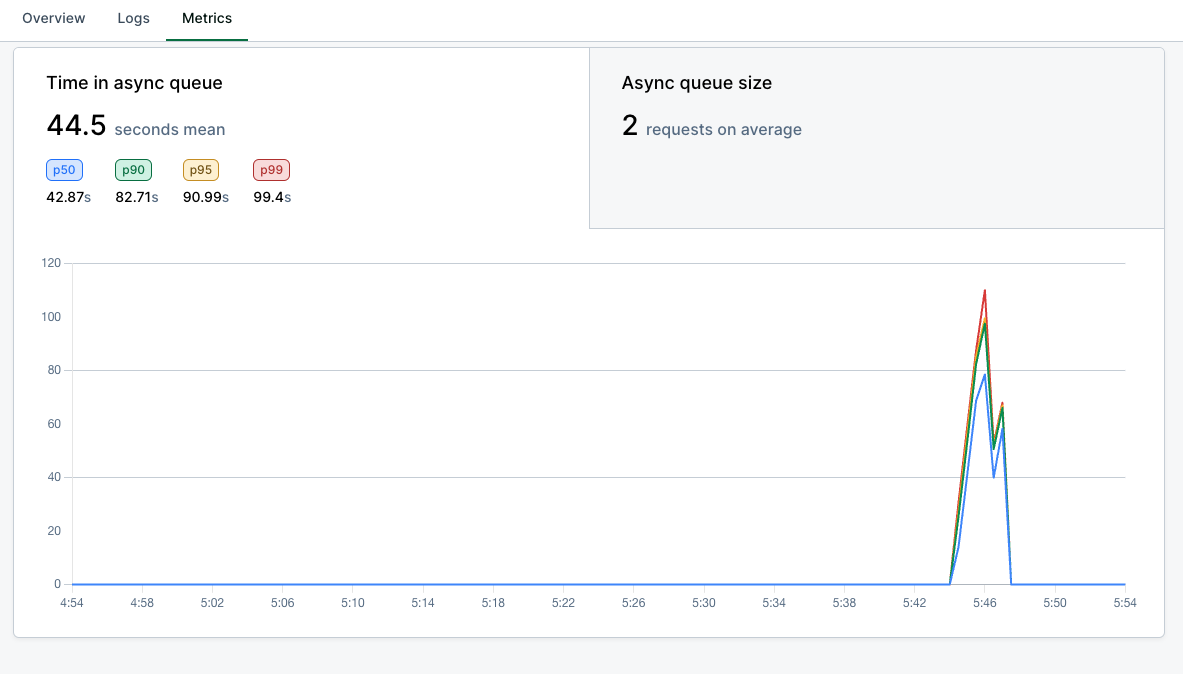
## Observability
Async metrics are available on the
[Metrics tab](/observability/metrics#async-queue-metrics) of your model
dashboard:
* **Inference latency/volume**: includes async requests.
* **Time in async queue**: time spent in `QUEUED` state.
* **Async queue size**: number of queued requests.
 ## Related
Configure webhook secrets in your Baseten settings to secure webhook delivery.
## Related
Configure webhook secrets in your Baseten settings to secure webhook delivery.