> ## Documentation Index
> Fetch the complete documentation index at: https://docs.baseten.co/llms.txt
> Use this file to discover all available pages before exploring further.
# Develop a model on Baseten
> Package, configure, and iterate on a model with Truss at whatever level of control your model needs.
This section covers building and deploying your own models on dedicated infrastructure. You package a model with [Truss](https://github.com/basetenlabs/truss), our open-source CLI, then push it to Baseten for deployment, autoscaling, and observability. For hosted open-source models with no deployment step, see [Model APIs](/inference/model-apis/overview) in the Inference section.
## How you develop a model
You work with a Truss at increasing levels of control, and you only go as deep as your model requires:
* **The CLI** runs the loop you live in. `truss push --watch` creates a development deployment, `truss watch` live-patches your changes in seconds, and `truss push --promote` ships to production. See [The development loop](/development/model/deploy-and-iterate).
* **`config.yaml`** declares your runtime: GPU, dependencies, base image, and weights. Most popular open-source LLMs deploy from config alone, served on TensorRT-LLM with an OpenAI-compatible API and no code required. See [Configuration](/development/model/configuration) and [Dependencies](/development/model/dependencies).
* **`model/model.py`** holds custom code. Write a Python `Model` class with `load` and `predict` when configuration can't express your logic, such as custom preprocessing, postprocessing, or an unsupported architecture. See [The Model class](/development/model/model-class).
If none of these fit, for example you bring a pre-built container like vLLM, SGLang, or Triton, drop to a [custom Docker server](/development/model/custom-server).
## Pick a starting point
* **Config-only:** Deploy a model from a single `config.yaml`. Start with [Build your first model](/development/model/build-your-first-model).
* **Custom Python:** Write a `Model` class with `__init__`, `load`, and `predict`. Start with [The Model class](/development/model/model-class).
* **Custom Docker:** Bring your own container. See [Custom Docker servers](/development/model/custom-server).
 ## The development cycle
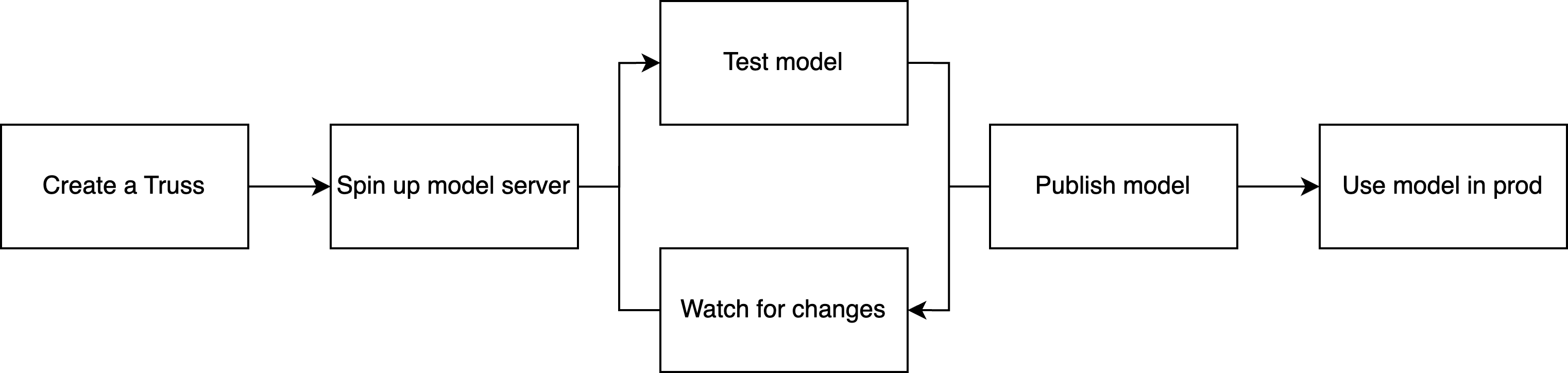
Whichever surface you use, the iteration workflow is the same: push a development deployment, make changes with live reload, and publish when you're ready for production traffic.
1. **Push to development.** Run `truss push --watch` to create a development deployment, a single-replica instance with live reload enabled, designed for fast iteration rather than production traffic.
2. **Iterate with live reload.** Run `truss watch` to start a file watcher that syncs local changes to your development deployment in seconds, without rebuilding the container. Edit, save, and see the result in the deployment logs.
3. **Publish to production.** Run `truss push` to create an immutable, production-ready deployment with full autoscaling. Promote it to an [environment](/deployment/environments) for a stable endpoint URL that doesn't change between versions.
Development deployments run slightly slower than published deployments and are limited to one replica. They exist to give you a fast feedback loop, not to serve real traffic. See [The development loop](/development/model/deploy-and-iterate) for the full workflow.
## Build multi-model systems
When your workflow spans multiple models or steps that need different hardware, like a RAG pipeline with separate retrieval and generation stages, orchestrate them with [Chains](/development/chain/overview). Each step runs on its own hardware with its own scaling rules. Many projects start with a single self-deployed model and wrap it in a Chain as the system grows.
## The development cycle
Whichever surface you use, the iteration workflow is the same: push a development deployment, make changes with live reload, and publish when you're ready for production traffic.
1. **Push to development.** Run `truss push --watch` to create a development deployment, a single-replica instance with live reload enabled, designed for fast iteration rather than production traffic.
2. **Iterate with live reload.** Run `truss watch` to start a file watcher that syncs local changes to your development deployment in seconds, without rebuilding the container. Edit, save, and see the result in the deployment logs.
3. **Publish to production.** Run `truss push` to create an immutable, production-ready deployment with full autoscaling. Promote it to an [environment](/deployment/environments) for a stable endpoint URL that doesn't change between versions.
Development deployments run slightly slower than published deployments and are limited to one replica. They exist to give you a fast feedback loop, not to serve real traffic. See [The development loop](/development/model/deploy-and-iterate) for the full workflow.
## Build multi-model systems
When your workflow spans multiple models or steps that need different hardware, like a RAG pipeline with separate retrieval and generation stages, orchestrate them with [Chains](/development/chain/overview). Each step runs on its own hardware with its own scaling rules. Many projects start with a single self-deployed model and wrap it in a Chain as the system grows.