> ## Documentation Index
> Fetch the complete documentation index at: https://docs.baseten.co/llms.txt
> Use this file to discover all available pages before exploring further.
# AI tools
> Connect your AI coding tools to Baseten so they can operate your workspace and answer with grounded knowledge.
Baseten plugs into AI coding tools like Claude Code, Cursor, and VS Code through our skill [(repo)](https://github.com/basetenlabs/baseten-skills) and two MCP servers. Your assistant can operate your workspace and ground its answers in current documentation. Baseten annotates each operation as read-only or mutating (deploy, promote, delete), so your agent can iterate quickly and safely in auto-mode.
Our [evaluations](https://github.com/basetenlabs/baseten-skills/blob/main/evals/baseten/README.md) show the toolkit with MCPs completes tasks with fewer tokens and less wall-clock time than calling the REST API or CLI directly.
**Skill vs. MCP:** the MCP servers let your agent *act* on a Baseten workspace and *search* the docs; the skill teaches it how to do that effectively. Use both.
## What you can do
Once connected, your agent can drive the full model lifecycle from inside your editor:
* **Author and deploy:** create and push a custom Truss model or a multi-step Chain; deploy a pre-optimized model from the library; or call a hosted model through Model APIs.
* **Optimize:** pick the right runtime (TRT-LLM, BEI), tune the config, and iterate on a live deployment with `truss watch`.
* **Debug:** pull build and deployment logs, trace a failure, get a fix.
* **Operate:** promote across environments, adjust autoscaling, activate or deactivate, run a test prediction.
* **Observe:** status across models, deployments, training jobs, and environments.
* **Train and fine-tune:** launch and monitor training jobs (SFT, RL, LoRA), manage checkpoints, and deploy the result.
* **Q\&A over docs and best practices:** answers grounded in current documentation, guides, and examples.
## Set up
Create an API key with management permissions in your [API key settings](https://app.baseten.co/settings/api_keys) and set it in your shell so the installer can read it:
```bash macOS / Linux theme={"system"}
export BASETEN_MCP_KEY=...
```
```powershell Windows theme={"system"}
$env:BASETEN_MCP_KEY = "..."
```
To persist the key, add the line to your shell profile (`~/.zshrc` or `~/.bashrc`; on Windows, run `setx BASETEN_MCP_KEY "..."`).
Then install the skill and both MCP servers (requires Node 18+):
```md Agentic wrap theme={"system"}
# Copy this into your agent of choice:
Install the Baseten agent toolkit following the instructions at github.com/basetenlabs/baseten-skills, all global (-g -y):
the `baseten` skill, the backend MCP https://api.baseten.co/mcp with header "Authorization: Bearer $BASETEN_MCP_KEY", and the docs MCP https://docs.baseten.co/mcp.
Run the commands in a shell where BASETEN_MCP_KEY is set; don't print the key. Then tell me how to verify and whether to restart.
```
```bash macOS / Linux theme={"system"}
npx skills add basetenlabs/baseten-skills -g -y
npx add-mcp https://api.baseten.co/mcp -g -y --header "Authorization: Bearer ${BASETEN_MCP_KEY}"
npx add-mcp https://docs.baseten.co/mcp -n baseten_docs -g -y
```
```powershell Windows theme={"system"}
npx skills add basetenlabs/baseten-skills -g -y
npx add-mcp https://api.baseten.co/mcp -g -y --header "Authorization: Bearer $env:BASETEN_MCP_KEY"
npx add-mcp https://docs.baseten.co/mcp -n baseten_docs -g -y
```
* `-g` installs for every detected tool
* `-y` skips prompts.
Restart your agent, then confirm both servers connected. In Claude Code, run `/mcp`:
```
baseten ✔ connected
baseten_docs ✔ connected
```
Then start prompting, or invoke the skill with `/baseten`.
Its API key scopes each MCP instance to one workspace. To work with multiple workspaces, install additional instances under different names with different keys.
## Set up for a specific agent
To wire up a tool by hand, add the MCP servers to its config (the docs server needs no auth, so omit its header for a docs-only setup) and install the skill with `npx skills add basetenlabs/baseten-skills`.
```json Cursor (mcp.json) theme={"system"}
{
"mcpServers": {
"baseten": {
"type": "http",
"url": "https://api.baseten.co/mcp",
"headers": { "Authorization": "Bearer ${BASETEN_MCP_KEY}" }
},
"baseten-docs": { "type": "http", "url": "https://docs.baseten.co/mcp" }
}
}
```
```json VS Code (.vscode/mcp.json) theme={"system"}
{
"servers": {
"baseten": {
"type": "http",
"url": "https://api.baseten.co/mcp",
"headers": { "Authorization": "Bearer ${BASETEN_MCP_KEY}" }
},
"baseten-docs": { "type": "http", "url": "https://docs.baseten.co/mcp" }
}
}
```
```bash Claude Code theme={"system"}
npx skills add basetenlabs/baseten-skills
claude mcp add --transport http baseten https://api.baseten.co/mcp --header "Authorization: Bearer ${BASETEN_MCP_KEY}"
claude mcp add --transport http baseten-docs https://docs.baseten.co/mcp
```
`npx add-mcp` and `npx skills add` also detect Codex, Antigravity, Goose, Windsurf, and other supported agents. For GUI clients like Claude Desktop, add the server URL under their connector settings. Any MCP-compatible tool works with the URLs above.
## Pull docs into your agent
* **Direct URLs:** agents can append `.md` to any page URL for clean, low-token content, or use [llms.txt](https://docs.baseten.co/llms.txt) (page index) and [llms-full.txt](https://docs.baseten.co/llms-full.txt).
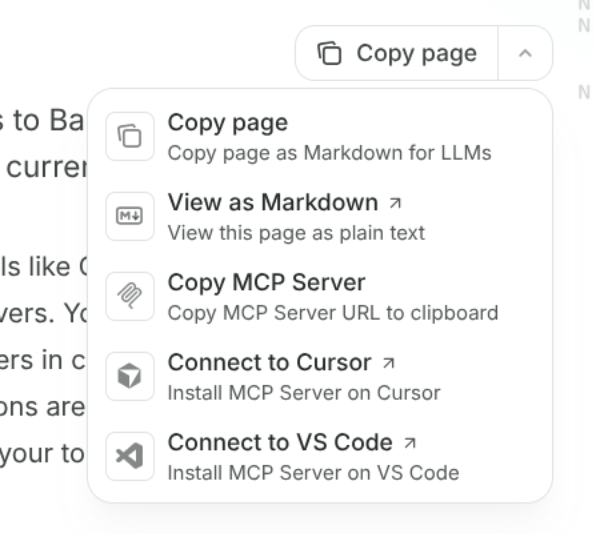
* **Context menu:** the "Copy page" button at the top-right of any page copies it as Markdown (or opens it as plain text) to paste into your agent:
 These docs also auto-host a lightweight single-file skill at [docs.baseten.co/skill.md](https://docs.baseten.co/skill.md) (`npx skills add https://docs.baseten.co`). The `baseten` skill above supersedes it; reach for the docs skill only where you can't install from the repo.